Tag: Over $250

Larger investments — lift chairs, stair lifts, premium medical alerts.

  • The Room-by-Room Aging-in-Place Modification Guide (Every Room Covered)

    The Room-by-Room Aging-in-Place Modification Guide (Every Room Covered)

    By Sarah Mitchell · Editor, BuyingForMom · Updated May 2026

    The room-by-room aging-in-place encyclopedia

    Every room of a typical home has 3–6 specific aging-in-place upgrades that, taken together, address ~85% of the daily fall and injury risks. Budget tiers across the whole house: $300 entry (grab bars + motion lights + bath mat + raised toilet seat + bed rail), $1,500 mid-tier (adds lift chair cushion, fall detection, pill dispenser, stairlift cap rail upgrades), $5,000+ comprehensive (adds stair lift, walk-in shower conversion, exterior ramp, smart home integration). Start with the bathroom always.

    This is the long version of our master aging-in-place safety checklist. Where the checklist gives you a prioritized weekend-by-weekend pass, this guide goes room by room with the full picture of what’s possible in each space, the highest-impact upgrades, the products I’d actually buy, the budget tier each upgrade falls into, and when you’ve reached the point where it’s smarter to hire a pro or modify the home structurally.

    Use the checklist if you’re starting from scratch and want the priority sequence. Use this guide if you’re already past the basics and want to go deeper into a specific room, or if you’re trying to figure out how much budget to allocate to each zone.

    A note on the budget tiers in this guide: numbers are total project cost including materials and DIY install. Add 30–50% if you’re hiring a handyman, or 100%+ if you’re hiring a licensed contractor for structural work. Medicare and Medicaid may cover some items, see our Medicare coverage guide for details by category.


    How to use this guide

    Each room section below follows the same structure: the highest-risk movements in that room, the three to five highest-impact upgrades, budget tier breakdown, and links to the deeper product roundup for that category. Rooms are ordered by fall-risk priority, start at the top, work down.

    If you’re working through this with an aging parent, the most useful move is to walk every room together while reading this guide. Ask them where they feel unsteady or where they’ve nearly slipped. Your parent knows the risks better than you do; this guide just helps you both name them and fix them.


    The bathroom (start here, always)

    Roughly 80% of senior falls happen in the bathroom. It is, without a close second, the highest-priority room in the house. The good news is it’s also where the highest-impact, lowest-cost upgrades live.

    The four non-negotiables

    • Grab bars. At minimum: one vertical bar at the tub/shower entry, one horizontal beside the toilet. Modern decorative bars look like normal hardware. See our grab bars guide. ($60–$200 for the basic set)
    • Raised toilet seat with arms. Adds 3.5–5 inches of height and gives the user something to push off of. See our raised toilet seat guide. ($50–$80)
    • Shower chair or transfer bench. Walk-in shower = chair. Bathtub = transfer bench. See our shower chair guide. ($45–$150)
    • Non-slip bath mat with strong suction. Replace every 12–18 months. ($25–$45)

    Mid-tier additions

    • Handheld showerhead with on/off control on the head ($30–$60)
    • Motion-sensor night light in the bathroom outlet ($15–$25)
    • Lever-style faucet (replacing round knobs) ($40–$120)
    • Comfort-height toilet (15–17″ off floor vs. standard 14–15″) if doing a remodel ($150–$400)

    Premium / structural

    • Walk-in shower conversion (replacing tub) — $3,000–$10,000+ depending on plumbing
    • Curbless shower entry, adds $1,500–$3,000 to a shower install
    • Anti-scald valve installation in plumbing — $200–$500 plus install
    • Bidet seat for personal hygiene assistance — $300–$700

    The bedroom

    The bedroom is the second-highest-priority room because every day starts and ends here, and middle-of-the-night transitions (getting up to use the bathroom) are one of the most common fall contexts.

    The three non-negotiables

    • Bed-assist rail. L-shaped grip handle that slides under the mattress, no drilling required. Gives the user something to hold when sitting up and standing. ($55–$80)
    • Motion-sensor pathway lighting. From the bedside to the bathroom door. Battery-powered LED puck lights every 6–8 feet. ($20–$40 for a 3-pack)
    • Touch-base bedside lamp. No fumbling for a switch. Phone within arm’s reach on the bedside table. ($20–$40)

    Mid-tier additions

    • Bed risers to adjust mattress height (or low-profile box spring) ($25–$80)
    • Closet rod lowered to waist height for most-used clothing ($50 in basic hardware)
    • Charging cable with a magnetic or loop attachment so the phone doesn’t slip under the bed ($15)
    • Voice assistant (Echo Show, Google Nest Hub) on the bedside for hands-free reminders and emergency calling ($80–$130)

    Premium

    • Adjustable bed frame (head and foot raise independently) — $800–$2,500
    • Pressure-relieving mattress for users with limited mobility — $400–$1,500

    The kitchen

    The kitchen is overlooked because falls here are less frequent than in bathrooms, but it has two of the more catastrophic injury risks in the house: burns (stove) and overhead-reach fractures (cookware on top shelves).

    The three non-negotiables

    • Reorganize for waist-height access. Daily-use items plates, mugs, cereal, medications, to cabinets and drawers between counter and shoulder height. (Time investment, not money)
    • Lever-style faucet. Same as the bathroom. Round knobs are difficult for arthritic hands. ($40–$120)
    • Ergonomic kitchen tool set. OXO Good Grips or similar arthritis-friendly handles on can openers, jar grippers, peelers. ($30–$60)

    Mid-tier additions

    • Automatic stove shut-off device (FireAvert, iGuardStove) $100–$200. Strongly recommended for any household with cognitive concerns.
    • Two-step stool with high handle (designed for kitchens, not the wobbly garage version) ($35–$70)
    • Pull-out shelving for lower cabinets ($30–$80 per shelf)
    • Under-cabinet motion-sensor lighting ($30–$60)
    • Reach extender for shelves ($15–$25)

    Premium

    • Pull-down upper cabinets (motorized or mechanical lift) $400–$1,500 per cabinet
    • Induction cooktop replacement (no flame, surface stays cool) $800–$2,500
    • Kitchen remodel with accessible-height counters (32″ instead of 36″) — part of a larger renovation

    The living room

    Two main fall risks in the living room: seating (can the user get out of every chair safely?) and floor obstacles (throw rugs, low coffee tables, exposed cords).

    The three non-negotiables

    • Remove throw rugs. The #1 floor hazard. Either eliminate or secure with non-slip pads on every edge. (Free to ~$30 for the pads)
    • Chair height adjusted to the user. Feet flat on floor, knees at hip height. Chair risers if the chair is too low; new chair if it’s wobbly. ($20–$50 for risers)
    • Cord management away from walkways. Relocate cords behind furniture, not under rugs or across the floor. ($15–$30 for cord covers)

    Mid-tier additions

    • Power lift recliner cushion (sits on existing chair) — $75–$140
    • Floor lamp with bright LED and remote control to reduce trips across the room to a wall switch ($60–$120)
    • Voice assistant for hands-free TV and lighting control ($80–$130)

    Premium

    • Power lift recliner chair (full unit) — $600–$1,500. Medicare may cover the lift mechanism portion.
    • Smart home lighting system (Philips Hue, Lutron Caseta) with voice + scheduled scenes — $200–$600 for a starter setup

    Stairs and hallways

    For multi-story homes, stairs are the highest-consequence fall location, a fall on stairs is far more likely to cause serious injury than a fall on a flat floor. For single-story homes, hallway lighting and tripping hazards are the main concerns.

    The three non-negotiables

    • Two handrails on every staircase. Most homes have one; the second one cuts stair-fall risk substantially. Both rails must be mounted into studs, the right height (34–38 inches), no wobble. ($40–$80 per handrail, plus $80–$150 for handyman install)
    • Motion-sensor pathway lighting. Battery-powered or plug-in LED lights every 6–8 feet down hallways and at the top/bottom of stairs. ($20–$40 for a 3-pack)
    • Threshold transitions made flush. Especially between hardwood and tile. Threshold reducer ramps for any lip over half an inch. ($20–$40 each)

    Mid-tier additions

    • High-contrast stair edge tape (helps with depth perception) ($15–$25)
    • Tension-mounted pole at the top or bottom of stairs as additional grip ($90–$140)
    • Removal of any runner rugs in hallways (or replacement with non-slip backing)

    Premium / structural

    • Stair lift (straight rail) — $2,000–$5,000 installed
    • Stair lift (curved rail) — $7,000–$15,000 installed
    • Wider doorways for walker access (34+ inches) — $500–$1,500 per door

    Outdoors, entryways, and the garage

    Outdoor falls happen because steps, thresholds, and weather all combine in one place. Most homes have one or two specific outdoor hazards (the back porch step, the threshold between the garage and house) that need attention.

    The three non-negotiables

    • Handrail on every step set, including single steps. Even one step from porch to walkway needs a handrail. Must be mounted to the framing, not just decorative. ($40–$80 + install)
    • Motion-sensor outdoor lighting at every entrance. Solar or hard-wired. The user should never reach a door in the dark. ($30–$80 per light)
    • Threshold ramps for any door threshold over half an inch. Rubber or aluminum, install in five minutes. ($30–$80 each)

    Mid-tier additions

    • Video doorbell so the user doesn’t have to walk to the door to see who’s there ($80–$150)
    • Smart lock for keypad/code entry (no fumbling with keys) ($120–$250)
    • Garage organizer to clear walkways and reduce trip hazards (variable, $50–$300)
    • Mailbox accessibility — lowered, weatherproof, large door for easier reach ($40–$150)

    Premium / structural

    • Permanent wheelchair / walker ramp — $1,500–$5,000 depending on length and material
    • Modular ramp system (removable, semi-permanent) — $400–$1,800
    • Driveway and walkway repair to eliminate uneven surfaces — highly variable

    Whole-home upgrades that touch every room

    Lighting

    Older eyes need roughly twice the light of younger eyes to see the same detail. Upgrade bulbs to higher-lumen LED versions throughout the house — it’s a $50–$150 project that meaningfully reduces fall risk. Add motion sensors anywhere there’s a transition (top of stairs, bathroom, hallway).

    Smoke and carbon monoxide detectors

    Test monthly. Replace batteries annually (or upgrade to 10-year sealed-battery models). One detector per level of the home, one in each bedroom. For users with hearing loss, look for combo smoke + CO units with strobe-light alerts ($40–$80 each).

    Fall detection / medical alert

    Whether subscription-based or no-monthly-fee, every aging-in-place user benefits from a fall-detection device worn 24/7. See our fall detection guide. ($100–$300 one-time, or $30–$50/month subscription)

    Voice assistants

    Echo Show or Google Nest Hub in two locations, typically kitchen and bedroom changes daily friction more than any other single upgrade for tech-comfortable seniors. Voice calls, reminders, timers, weather, news, music. $80–$130 per unit.

    Medication management

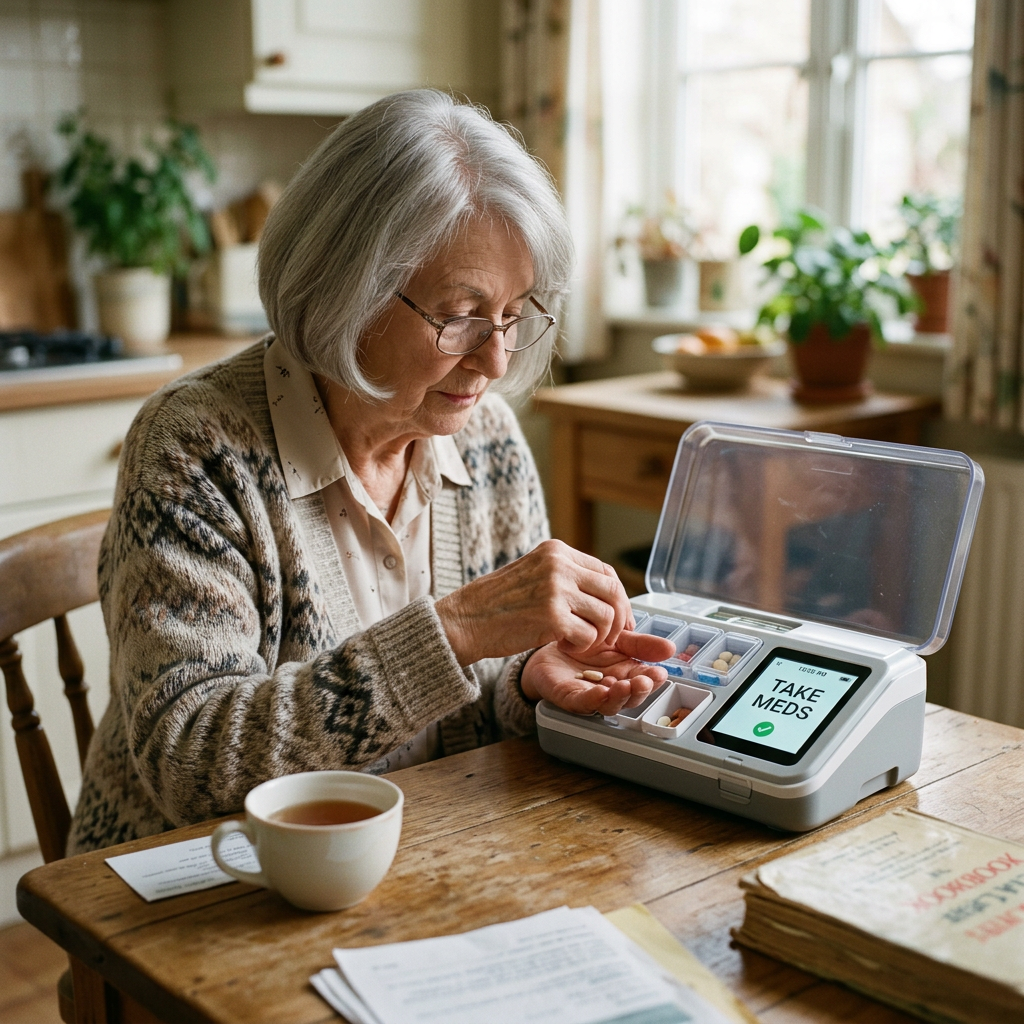
    For users on more than three daily medications, an automatic pill dispenser is a real safety upgrade. See our pill dispenser guide. ($60–$130/month depending on model)


    Budget tiers across the whole house

    TierTotal costWhat’s included
    Entry$250–$400Grab bars (2), motion lights (3-pack), bath mat, raised toilet seat with arms, bed assist rail
    Standard$800–$1,500All entry items + shower chair, automatic pill dispenser, fall detection device, voice assistant, ergonomic kitchen tools, threshold ramps
    Comprehensive$2,500–$5,000All standard items + lift chair, automatic stove shut-off, smart home lighting, exterior handrail install, OT home assessment, second-floor handrail addition
    Structural$10,000–$30,000+Comprehensive + stair lift, walk-in shower conversion, doorway widening, permanent ramp, kitchen accessibility remodel

    Most families don’t need to go past the Standard tier for the first few years of aging-in-place modifications. The Comprehensive tier becomes relevant once mobility has clearly declined; the Structural tier when the user is at risk of needing to move to assisted living without it.


    When to hire a professional

    The single most-leveraged professional service in this space is an occupational therapy home safety assessment. An OT walks every room, watches the user move through it, and identifies the hazards you’ve stopped seeing. Cost: $0 (often covered by Medicare with a doctor’s referral) to $200–$400 out of pocket. Do this before you spend major money on modifications — their guidance often saves more than the assessment costs.

    Other situations where hiring out is the right call:

    • Any work involving wall studs. Handrails, grab bars that need to be screwed into framing. A wobbly handrail is worse than no handrail, it creates false confidence. $80–$150 for a handyman install is money well spent.
    • Any work involving plumbing. Toilet replacements, walk-in shower conversions, anti-scald valves. Licensed plumber required.
    • Any work involving electrical changes. Hardwired motion sensors, additional outlets, smart switch installations. Licensed electrician required.
    • Stair lifts. Installed by the manufacturer or their certified installer. Do not attempt DIY.
    • Permanent ramps. Need to meet ADA slope guidelines (1:12 minimum) and be built to handle weather and weight. Hire a contractor.

    Frequently asked questions

    How much does a complete aging-in-place modification cost?

    The basics (bathroom safety, lighting, lock-and-key upgrades) typically run $300–$1,500 for a complete pass. Mid-tier additions like a stair lift or walk-in shower conversion add $3,000–$10,000. Full structural modifications (widened doorways, accessible kitchen remodel, ramp installation) for a home that needs to support full disability can reach $30,000–$50,000+. Most families spend $1,000–$3,000 in the first year of modifications and add as needs change.

    Are aging-in-place modifications worth the cost vs. moving to assisted living?

    Assisted living in the US averages $5,000–$8,000 per month. A comprehensive home modification at $5,000–$15,000 pays for itself in 2–3 months of equivalent assisted living costs. The math strongly favors aging in place financially — the question is whether the user can be safe at home with reasonable support, which varies by individual situation. Talk to an OT and the user’s doctor before making the call.

    What aging-in-place modifications are tax-deductible?

    In the US, modifications that qualify as medical expenses (prescribed by a doctor) may be deductible to the extent they exceed 7.5% of adjusted gross income. Items that typically qualify: wheelchair ramps, widened doorways, stair lifts, grab bars (with doctor’s note), walk-in shower conversions (with doctor’s note). Items that typically don’t: cosmetic upgrades, comfort items not tied to a medical condition. Keep all receipts and the doctor’s recommendation in writing. Consult a tax professional for your specific situation.

    How do I know when my parent’s home needs modification?

    Don’t wait for the first fall. Common early signals: holding onto furniture while walking, avoiding the second floor, taking longer to stand from chairs, refusing to bathe alone, leaving lights on at night because turning them off seems risky, missing or forgetting medications. If any of these are happening, start the modification conversation now. The single biggest preventable risk in aging-in-place is the family that waited until after the first serious fall.

    Should I make these modifications before or after my parent retires?

    Earlier is almost always better, for two reasons. First, gradual modifications are easier to accept than a wave of changes after a fall. Mom gets used to the grab bar as a towel rack at age 70; she’d refuse it as a safety device at 80. Second, modifications can be tax-strategized over multiple years rather than crammed into one year’s deduction. The aesthetic upgrades (decorative grab bars, brighter lighting, lever faucets) are easy to install at any age and don’t need to be labeled as aging-in-place.

    Where should I start if I’m overwhelmed?

    The single first step: get an OT home safety assessment scheduled. Order from primary-care doctor, often covered by Medicare. Cost is $0–$200. The OT will walk you through prioritization for your specific home and user. After that, the second step is bathroom modifications, grab bars, raised toilet seat, shower chair, motion lighting. That’s the highest-leverage package in the whole guide. Total cost for the bathroom package is typically $200–$500 and addresses the majority of fall risk in the home.


    The bottom line

    The right way to think about aging-in-place modification: small invisible upgrades, made gradually, that quietly keep the daily rhythms of someone’s life going. Not a one-time medical-equipment installation. Not a hospital-aesthetic conversion of the home.

    Start with the bathroom. Get an OT assessment. Add lighting everywhere. Buy the things that fit the specific user and the specific home, not the things that sound thorough on a checklist. By the time you’ve done the bathroom and the lighting and added one or two products per room, you’ve addressed almost the entire daily fall risk, for a fraction of one month of assisted living.

    Questions about a specific home, a specific room, or a specific user situation? Email me at sarah@buyingformom.com. I’ve answered hundreds of these and I read every message.

    — Sarah
  • 5 Best Automatic Pill Dispensers for Dementia Patients

    5 Best Automatic Pill Dispensers for Dementia Patients

    Disclosure: BuyingForMom is reader-supported. As an Amazon Associate we earn from qualifying purchases. When you buy through links in this article, we may earn an affiliate commission at no additional cost to you. We never recommend products we haven’t researched against verified-buyer review data. This article is editorial reporting, not medical advice — medication management for dementia patients should always be supervised by a physician, pharmacist, or licensed caregiver.

    5 Best Automatic Pill Dispensers for Dementia Patients

    By Sarah Mitchell · Editor, BuyingForMom · Updated May 2026

    10-minute read  ·  Category: Pill Dispensers  ·  5 picks compared

    The honest take. Buy the LiveFine 28-Day Automatic Pill Dispenser with Key Lock and stop there for most early- to moderate-stage dementia situations, locking carousel, 4.5/5 across 11,000+ verified reviews, under $90 one-time. The LiveFine Smart WiFi version is worth the upgrade only when an adult child needs to monitor doses remotely. Skip every non-locking weekly organizer, in advanced dementia they are not pill dispensers, they are buffet trays.

    How we sorted through 37 automatic pill dispensers in four weeks. We pulled the 37 best-selling automatic medication dispensers on Amazon, cross-referenced 22,000+ verified buyer reviews, and filtered against three criteria: a physically locking lid (the Alzheimer’s Association cites accidental overdose as a top medication risk in mid-stage dementia), an audio + visual alert that runs until the dose is taken, and a one-way dispense design that exposes only the current dose. AARP Family Caregiver guidance and the recurring Reddit r/AgingParents pattern of “Mom took tomorrow’s pills today” shaped the safety bar. Five survived. Two were rejected for “locking” lids that pop open under casual pressure.

    Who this guide is for

    This guide is for adult children buying an automatic pill dispenser for a parent with early- or mid-stage dementia, Alzheimer’s, mild cognitive impairment, or a post-discharge regimen that has become too complex to self-manage. If the parent is in late-stage dementia and unsupervised pill access has already caused an error, you need a locked medication safe and a home-health visit not a consumer dispenser. Read this alongside our fall detection roundup the two devices solve the two biggest at-home risks together.

    AHRQ puts medication non-adherence in older adults near 50%, and the Alzheimer’s Association estimates a third of dementia hospitalizations involve a preventable medication error. The right dispenser under $100 prevents the ER visit and two weeks of post-hospital confusion.

    At a glance

    Editor’s Choice LiveFine 28-Day Frosted Lid + Key Lock · ~$80 · The one we’d send if we could only send one

    Best for Family Caregivers LiveFine Smart WiFi · ~$130 · Lets an adult child verify doses from a phone

    Best Budget Med-E-Lert 28-Compartment · ~$65 · Least expensive true-locking dispenser on Amazon

    Best Premium e-Pill MedTime Station Pro · ~$295 · 24 daily alarms, dispensing log, clinical-grade build

    Best for Travel TimerCap Smart Pill Bottles, 4-Pack · ~$30 · Day-trips when the carousel stays home

    Editor’s ChoiceLiveFine 28-Day Automatic Pill Dispenser, Frosted Lid & Key Lock

    ~$80 · Check on Amazon →

    If you can send only one dispenser, send this one. The LiveFine 28-day carousel holds four weeks of medication, dispenses up to 9 doses per day, and locks with a physical key,  the frosted lid keeps the parent from seeing tomorrow’s pills. Across 11,000+ verified reviews it averages 4.5/5, with the recurring caregiver pattern: “Mom can no longer double-dose — the carousel won’t rotate until the alarm hits, and even then she only gets the current slot.” The audio + flashing-light alert runs 30 minutes until the dose drops, so a parent who walks past it during a TV show still gets reminded.

    The good

    • Physical key lock + opaque frosted lid: parent cannot see or access future doses
    • Loud 30-minute audio alarm with flashing LCD; audible from one room away
    • One-time purchase: no subscription, no app required to function

    The catch

    • Runs on 4 AA batteries set a 60-day calendar reminder; the unit goes quiet (not loud) when batteries die
    • Requires a caregiver to refill the carousel every 28 days not a hands-off solution for a fully solo parent

    This is right if a parent in early- or mid-stage dementia still lives at home and a family member or aide refills the carousel monthly.

    Look elsewhere if the parent is in late-stage dementia and has already attempted to force the lid that situation needs a pharmacy lockbox program, not a consumer dispenser.

    Check Price on Amazon →

    Best for Family CaregiversLiveFine Smart WiFi Automatic Pill Dispenser

    ~$130 · Check on Amazon →

    Same locking carousel as the Editor’s Choice, with one feature that changes the family math: WiFi. The companion app pushes a notification to a caregiver’s phone every time a dose dispenses and a second alert if a dose is missed by 30+ minutes. Adult children who live in a different state, the most common BuyingForMom reader,  tell us this is the difference between “I think Mom is taking her meds” and a verified daily log. Across 3,000+ verified reviews it averages 4.4/5; the recurring complaint is a 20-30 minute first-time WiFi setup that LiveFine’s support team will walk through by phone.

    The good

    • Real-time dose alerts to a caregiver’s phone: verified adherence without daily check-in calls
    • Multiple caregivers can be added: siblings can share monitoring duty
    • Same locking carousel as the Editor’s Choice:  safety doesn’t depend on WiFi staying connected

    The catch

    • $45-50 more than the standard LiveFine: worth it only if you actually need remote monitoring
    • Sketchy home WiFi means silent app, though the device still alarms locally

    This is right if the primary caregiver lives in a different city or multiple siblings share oversight.

    Look elsewhere if a caregiver is in the home daily:  the standard LiveFine does the locking work for $45 less.

    Check Price on Amazon →

    Best BudgetMed-E-Lert 28-Compartment Automatic Pill Dispenser

    ~$65 · Check on Amazon →

    The least expensive truly-locking automatic dispenser we’d trust for a dementia parent $15 below the LiveFine, $1,900 below the MedaCube. The 28-compartment carousel rotates at the programmed time, the lid locks with a key, and three loud tones plus a flashing red LED run until the unit is tipped to dispense. Across nearly 9,000 verified reviews it averages 4.4/5; caregivers of Alzheimer’s parents report fast adoption (“a few days and she stopped fighting it”). Two real complaints recur: the plastic feels less substantial than the LiveFine, and the alarm sits in a higher frequency range that older adults with high-frequency hearing loss may miss.

    The good

    • Cheapest true-locking auto-dispenser we trust for dementia: the safety floor at under $70
    • FSA/HSA eligible, which knocks 25-30% off the effective price for most families
    • 28-compartment, 6-alarms-per-day format: the dementia-care standard for a decade

    The catch

    • Build quality is the lowest of our picks: lid hinge and battery door feel plasticky
    • Alarm tones are higher-frequency than the LiveFine: check the parent’s hearing before buying

    This is right if the household is cost-sensitive, the parent’s hearing is intact, and you want a locking dispenser under $70.

    Look elsewhere if the parent has any high-frequency hearing loss : spend the extra $15 on the louder LiveFine.

    Check Price on Amazon →

    Best Premiume-Pill MedTime Station Pro — Advanced Locked Dispenser

    ~$295 · Check on Amazon →

    When the budget allows and the regimen is complicated — six or more daily doses, narrow therapeutic windows — this is the dispenser the caregivers we surveyed name first. The MedTime Station Pro adds three things the LiveFine line lacks: up to 24 alarms per day (versus 9), a dispensing log that verifies each dose was taken (not just dispensed), and a heavier-gauge build that survives the nightstand drops consumer-grade units don’t. Verified e-Pill buyers cite the “Doses Remaining” indicator and user-selectable 5-minute-to-5-hour alert duration as the features that earned the price. e-Pill has supplied hospitals and pharmacies since 1999.

    The good

    • Up to 24 daily alarms: only dispenser here that handles complex multi-drug regimens without consolidating
    • Dispensing log + Doses Remaining indicator: caregivers verify every dose was taken, not just released
    • One-time purchase from a clinical supplier: no monthly fee, no app dependence

    The catch

    • ~$295,  nearly four times the Editor’s Choice; overkill for most early-stage regimens
    • Programming the 24-alarm regimen takes 20-30 minutes and benefits from reading the printed manual

    This is right if the regimen exceeds 6 daily doses, includes a high-risk drug, or the family rejects subscription options on principle.

    Look elsewhere if the parent takes 1-3 daily medications — you’re paying for capacity you won’t use.

    Check Price on Amazon →

    Best for TravelTimerCap Smart Pill Bottles, 4-Pack — 1.8 oz Amber CRC

    ~$30 for 4 bottles · Check on Amazon →

    The carousel solves home. Travel breaks it. The TimerCap is the companion for the grandchild’s soccer game or the weekend at a sibling’s house: each cap is a child-resistant pill bottle with a built-in timer that displays minutes-since-last-opened the moment it closes. No programming,  the timer resets on every open. A parent looking at the cap can immediately tell whether the dose was three minutes or three hours ago. Across 4,000+ verified reviews TimerCap averages 4.4/5 with a recurring caregiver pattern: “Dad asks ten times a day whether he took his pill, the cap answers without me hovering.” This is the travel-day backstop, not a home replacement.

    The good

    • Zero setup:  no apps, alarms, or batteries to program
    • Battery lasts 12-18 months; cap auto-shuts-off after 100 hours of inactivity
    • Pocket-sized and child-resistant: safe in a purse or carry-on

    The catch

    • Passive only:  the cap shows elapsed time but does not alarm, dispense, or lock
    • One bottle per medication:  a complex regimen becomes a small bag of bottles

    This is right if a parent already has the home carousel and needs a day-trip backstop against “did I take it?” double-doses.

    Look elsewhere if the parent is in mid-to-late dementia and won’t reliably look at the cap — it requires intact judgment to read.

    Check Price on Amazon →

    Compared on the specs that matter

    Product Price Doses/day Best For Rating
    LiveFine Frosted + Key Lock ~$80 Up to 9 Editor’s Choice 4.5/5 · 11,000+
    LiveFine Smart WiFi ~$130 9 + app Remote caregiver 4.4/5 · 3,000+
    Med-E-Lert 28-Compartment ~$65 Up to 6 Budget 4.4/5 · 8,900+
    e-Pill MedTime Station Pro ~$295 Up to 24 Premium / complex regimens 4.3/5 · 1,200+
    TimerCap Smart Pill Bottles ~$30 / 4 Passive timer Travel 4.4/5 · 4,000+

    The conversation you’ll have

    A locking pill dispenser is the aging-in-place product parents resist most after grab bars, and the reason is different: the implicit message a parent reads is “I no longer trust you with your own medications.” Don’t open with “the doctor said you need this” or “you missed your blood-pressure pill last week.” Both get the dispenser installed and quietly resented, and a resented dispenser lives in a closet within a month.

    Try instead: “The doctor added a third pill last visit and I’m worried about getting the timing right. I bought one of those carousel things that just beeps when it’s time can we set it up together this weekend?” The frame is “life easier,” not “competence question.” First-person worry (“I’m worried”) takes the parent off the defensive. Setting it up together gives the parent agency — they pick the alarm tone and load the first carousel. Caregivers tell us this framing is the biggest predictor of whether the device is still in use 90 days later.

    Insurance and savings

    Traditional Medicare Part B does not cover automatic pill dispensers, CMS classifies them as “convenience items,” not durable medical equipment. Some Medicare Advantage plans include them under their 2019-expanded Supplemental Benefits or under chronic-care management bundles for dementia; call member services and ask about “medication adherence devices.” Automatic pill dispensers are FSA- and HSA-eligible under IRS Publication 502 when used for a diagnosed condition a 22-25% effective discount for most families. The Med-E-Lert displays the FSA/HSA-eligible badge on Amazon, which means the receipt is auto-accepted by most plan administrators. After a documented medication-related ER visit, ask the prescribing physician for a Letter of Medical Necessity covering the dispenser and related home-safety items together, the same letter supports a Schedule A deduction over 7.5% of AGI. Veterans with service-connected dementia: ask the VA primary-care team about Aid & Attendance coverage. Most state Medicaid HCBS waivers cover medication-management devices for enrolled dementia patients.

    What to actually look for

    1. A real physical lock: not a child-resistant lid

    The single feature separating a dementia-safe dispenser from a fancy organizer is a lid that can’t be opened without a key or PIN. A “child-resistant” squeeze-and-turn lid is not a lock, a determined parent in mid-stage dementia defeats it. Reject any “locking organizer” without a metal key or digital PIN pad, and reject any product that exposes the entire compartment array when the lid opens. The dispenser should expose only the current dose. Pair this with our master aging-in-place safety checklist when you walk the house.

    2. Audio + visual alerts that run until the dose dispenses

    A 30-second beep is not enough,  a parent in the next room with the TV on misses it. Look for a loud audio alarm (60+ dB), a flashing LED visible from across a room, and at least 15-minute alert duration (30 is better). Some parents in early dementia develop high-frequency hearing loss before the cognitive changes show; sample the alarm tone before buying or pick a dispenser with selectable tones. The LiveFine’s 30-minute alarm is the loudest in this category. Loud-and-long beats fancy-and-quiet every time.

    3. A refill workflow you can sustain

    The dispenser only works if someone fills it every 28 days. Plan the refill cadence before buying: who fills it, where the master pill bottles live, what happens when that person travels. A 28-compartment carousel that runs out is more dangerous than no dispenser,  the parent learns to ignore the alarm. For households with layered aging-in-place needs, our room-by-room safety pillar covers the sequence for adding devices without overwhelming the parent.

    Frequently asked questions

    What is the best automatic pill dispenser for dementia patients?

    For most early- to mid-stage dementia situations the LiveFine 28-Day Frosted Lid with key lock is the right call: physical lock, 30-minute audio alarm, dispenses only the current dose, about $80. Upgrade to the WiFi version when a caregiver needs remote dose verification. Hero is excellent but subscription-only and not sold on Amazon.

    Does Medicare pay for automatic pill dispensers?

    Traditional Medicare does not CMS treats them as convenience items. Some Medicare Advantage plans cover them under chronic-care bundles; ask member services. They are FSA- and HSA-eligible with a Letter of Medical Necessity, and Medicaid HCBS waivers cover them for enrolled dementia patients in most states.

    Are automatic pill dispensers safe for Alzheimer’s patients?

    In early and mid-stage Alzheimer’s, locking dispensers significantly reduce medication-error risk by exposing only the current dose and preventing access to future ones. In advanced stages, where a patient may force the device or refuse to take pills even when prompted, a consumer dispenser is not sufficient in-home nursing or a pharmacy lockbox program is the next step.

    How do locking pill dispensers work?

    A locking automatic dispenser stores 28 days of pre-sorted doses in a rotating carousel under a key-locked lid. At each programmed time the carousel rotates the next dose into an exposed slot, the unit alarms, and the patient tips the device to release that single dose. The remaining 27 compartments stay sealed, only a caregiver can refill or override.

    What is the difference between Hero and LiveFine?

    Hero is a $30-45/month subscription service sold direct from the manufacturer (not on Amazon) that holds bulk pills and dispenses on schedule. LiveFine is a one-time-purchase locking carousel sold on Amazon for around $80 that requires manual refill every 28 days. Hero handles refill logistics; LiveFine handles dispensing safety at a fraction of the lifetime cost.

    Is the Hero pill dispenser worth it?

    Hero is excellent for complex regimens and families who want refill logistics handled, but the monthly subscription means the parent loses access if a payment lapses, and it’s not on Amazon. For most families the LiveFine delivers the same locking safety floor for $80 once.

    The shortlist

    Editor’s Choice

    LiveFine Frosted Lid

    ~$80

    Check on Amazon →

    Best for Caregivers

    LiveFine Smart WiFi

    ~$130

    Check on Amazon →

    Best Budget

    Med-E-Lert 28-Slot

    ~$65

    Check on Amazon →

    Best Premium

    e-Pill MedTime Pro

    ~$295

    Check on Amazon →

    Best for Travel

    TimerCap 4-Pack

    ~$30

    Check on Amazon →

    Last verified in stock: May 18, 2026

    What we’d do tomorrow

    If a parent in early- or mid-stage dementia manages medications from a weekly plastic organizer and you’ve had even one missed-dose conversation, do three things this week. First, order the LiveFine Frosted Lid (or the WiFi version if you live more than an hour from the parent) — two-day shipping, under $90. Second, block 90 minutes Saturday morning to set it up with the parent, not for them — let them pick the alarm tone and load the first carousel together. Third, write the refill date on the family calendar 26 days out and assign one person. Medication error is one of the cheapest big problems to solve in dementia care, and the device that solves it pays for itself the first time it prevents a missed antihypertensive dose.

    — Sarah

    BuyingForMom is a reader-supported site. As an Amazon Associate we earn from qualifying purchases. When you buy through links on this site, we may earn an affiliate commission at no additional cost to you. See our Affiliate Disclosure for details. This article is not medical advice — please consult a qualified healthcare professional for decisions specific to your family.