Tag: Fall Prevention

Products and modifications specifically focused on preventing falls.

  • 5 Best Walkers for Tall Seniors Over 6 Feet

    5 Best Walkers for Tall Seniors Over 6 Feet

    Disclosure: BuyingForMom is reader-supported. As an Amazon Associate we earn from qualifying purchases. When you buy through links in this article, we may earn an affiliate commission at no additional cost to you. We never recommend products we haven’t researched against verified-buyer review data. This article is editorial reporting, not medical advice.

    5 Best Walkers for Tall Seniors Over 6 Feet

    By Sarah Mitchell · Editor, BuyingForMom · Updated May 2026

    10-minute read  ·  Category: Walkers & Canes  ·  5 picks compared

    The honest take. If you’re shopping for a parent over 6′0″, buy the Drive Medical Nitro Tall and stop there for most situations, handles adjust to 41 inches, the 10-inch front casters handle uneven ground, and it’s the model OTs name first when the user is in the 6′0″-to-6′4″ range. The Helavo Heavy Duty is the right call only if the user is over 300 pounds. Skip any walker that maxes at 36 inches, that is the height that causes the hunched posture and lower-back pain a walker is supposed to prevent.
    How we sorted through 41 tall-friendly walkers in three weeks. We pulled the 41 best-selling walkers and rollators on Amazon advertised as suitable for tall users, cross-referenced 28,000+ verified buyer reviews, and filtered on one hard spec: manufacturer-stated maximum handle height. Anything under 38 inches was cut, the OT-prescribed floor for users over 6′0″, per the AOTA elbow-bend rule (15–30° bend on the grip). We then layered weight capacity, brake design, fold size, and recurring tall-user review patterns from Reddit r/Caregivers and AARP forums.

    Who this guide is for

    This guide is for adult children buying a walker for a parent 6′0″ or taller currently using a standard walker that forces them to lean forward at the shoulders. If you’re shopping for yourself, the same picks apply. Caregivers for a user over 300 pounds: jump to the bariatric pick. For a user with Parkinson’s or balance instability: the upright rollator pick.

    The clinical problem: standard walkers max at 34 to 36 inches, correct for the median senior at 5′4″ to 5′9″, six inches too low for a 6′2″ user. Held there for hours, the rounded-shoulder posture compresses lumbar discs and trains the body into the exact hunched gait the walker is supposed to prevent. OTs describe the right handle as the user’s wrist crease when arms hang relaxed, a natural 15–30° elbow bend on the grip. Over 6 feet, that’s 38 to 43 inches. Every product below clears 39.

    At a glance

    Editor’s Choice Drive Medical Nitro Tall Rollator · ~$240 · Handles to 41″, 10″ casters, the default tall pick

    Best Budget Drive Medical Two-Button Folding Walker · ~$48 · Handles to 39″, basic two-wheel walker, under $50

    Best for Parkinson’s ELENKER Upright Walker · ~$190 · Forearm armrests, upright posture, fits to 6′4″

    Best Lightweight Vive Tall Rollator Series T · ~$165 · 19 lb frame, folds to fit a trunk, handles 35–40″

    Best Bariatric & TallHelavo Heavy Duty Rollator · ~$210 · 500 lb capacity, handles to 41″

    Editor’s ChoiceDrive Medical Nitro Euro-Style Rollator, Tall Height
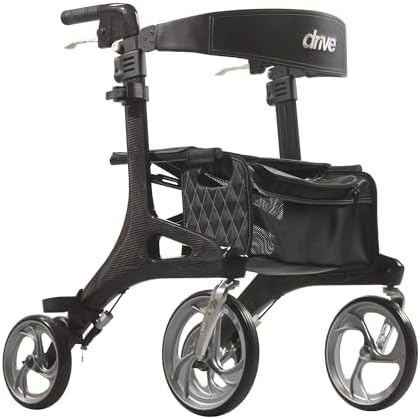
    Drive Medical Nitro Euro-Style Rollator in black, tall height variant with 10-inch front casters, padded seat, and curved backrest

    ~$240 · Max handle height: 41″ · Check on Amazon →

    Across 12,000+ verified Amazon reviews the Nitro line averages 4.6/5, and the tall variant (RTL10266BK-T) is the model OTs name first for users between 6′0″ and 6′4″. Handles adjust 36 to 41 inches in 1-inch increments — the 41-inch ceiling separates this from every standard rollator on the shelf. The 10-inch front casters roll over thresholds, gravel, and grass without bucking; the aluminum chassis weighs 17.5 pounds folded. Verified buyers consistently note the one-hand fold and rigid feel under load. Recurring complaint: the 300-pound capacity is real, not aspirational over that, jump to the OasisSpace pick.

    The good

    • Handles adjust to 41 inches, the highest in this guide for a standard 4-wheel rollator
    • 10-inch front casters handle outdoor terrain better than every 6-inch competitor
    • 17.5-pound frame folds one-handed and fits a sedan trunk without the seat removed

    The catch

    • 300-pound capacity is a real ceiling, not the right tool for bariatric users
    • Storage bag is small, expect to carry a separate tote for groceries

    This is right if the user is between 6′0″ and 6′4″, under 300 pounds, and wants one rollator for indoor and outdoor use.

    Look elsewhere if the user is over 300 pounds (jump to the OasisSpace pick) or has Parkinson’s freezing episodes (the upright ELENKER suits better).

    Check Price on Amazon →

    Best BudgetDrive Medical Two-Button Folding Walker with 5″ Wheels

    Drive Medical 10210-1 two-button folding walker with 5 inch front wheels and silver aluminum frame, basic two-wheel walker design

    ~$48 · Max handle height: 39″ · Check on Amazon →

    Most budget walkers cap at 34 to 36 inches and disqualify themselves on the first measurement. This Drive Medical two-button folder is the rare under-$50 option that pushes the handle to 39 inches, enough for a 6′0″ to 6′2″ user without forcing the hunch. Across 14,000+ verified reviews it averages 4.7/5 and ranks #1 in the standard-walker subcategory. It’s a two-wheeled walker: 5-inch front wheels, rear glide caps for resistance. Right tool for indoor use, post-surgical discharge, and users who want pushback from the back legs. 350-pound capacity. The catch is the seat-less design, if the user needs to rest mid-walk, this isn’t it.

    The good

    • Under $50 and still reaches 39-inch handle height, rare in the budget category
    • 350-pound capacity edges past most basic walkers
    • Two-button fold mechanism well-reviewed for arthritis-friendly operation

    The catch

    • No seat, not for users who need to rest during walks
    • 39 inches is the ceiling, users over 6′2″ need the Nitro or Vive

    This is right if the user is between 6′0″ and 6′2″, mostly indoors, and you want a sub-$50 walker that won’t force hunching.

    Look elsewhere if the user is over 6′2″ or needs a built-in seat for outdoor distance walking.

    Check Price on Amazon →

    Best for Parkinson’sELENKER Upright Rollator Walker, Stand-Up Frame

    ELENKER upright rollator walker in blue with padded forearm armrests, backrest, seat, and 10-inch front PU wheels for tall seniors

    ~$190 · Max armrest height: 41″ (fits 4′8″ to 6′4″) · Check on Amazon →

    For a tall user with Parkinson’s, balance instability, or post-stroke gait freezing, a standard rollator’s grip-handle geometry is the wrong tool entirely, gripping with the hands forces shoulder rounding and worsens the freezing. The ELENKER upright shifts support to padded forearm rests; the user leans on the elbows in an upright posture. Sized for users 4′8″ to 6′4″, with the armrest column extending to roughly 41 inches verified buyers at 6′2″ consistently report it’s the first walker that didn’t force them to bend. Across 5,400+ reviews it averages 4.4/5. The lower center of gravity tracks with what neurological PTs cite as the stability priority for Parkinson’s users. Catch: heavier and harder to fold than the Nitro.

    The good

    • Forearm rests force upright posture, the right geometry for Parkinson’s users
    • Fits up to 6′4″ with armrest column to roughly 41 inches
    • 10-inch PU front wheels and locking brakes hold steady during freezing episodes

    The catch

    • 30-pound frame is heavier and bulkier than standard rollators, harder to lift
    • Footprint is wider ,not ideal for narrow apartment hallways

    This is right if the user has Parkinson’s, MS, post-stroke balance issues, or any condition where grip-handle hunching is the wrong posture.

    Look elsewhere if the user has standard age-related mobility decline with no neurological component , the Nitro is lighter and easier to transport.

    Check Price on Amazon →

    Best LightweightVive Tall Rollator Walker (Series T)

    ~$165 · Max handle height: 40″ (fits up to 6′5″) · Check on Amazon →

    The Vive Series T is the lightest tall rollator in this guide at 19 pounds, meaningful if the user lifts the walker into a car trunk daily. Handles adjust 35 to 40 inches, fitting users up to 6′5″. Bicycle-style hand brakes sit at a neutral wrist angle buyers consistently call less fatiguing than the Nitro’s. The 8-inch wheels handle indoor surfaces and paved paths well but buck more on gravel than the Nitro’s 10-inch casters. Across 3,800+ verified reviews it averages 4.5/5.

    The good

    • 19-pound frame,  the lightest tall rollator in this guide
    • Handles to 40 inches, accommodates users up to 6′5″
    • Wider padded seat and angled bicycle-brake handles reduce wrist fatigue

    The catch

    • 8-inch wheels handle smooth ground, the Nitro’s 10-inch is better off-pavement
    • 300-pound capacity, not for bariatric users

    This is right if the user lifts the rollator into a vehicle frequently and most walking is on smooth surfaces.

    Look elsewhere if the user spends a lot of time on gravel, grass, or thresholds,  the Nitro’s larger wheels matter outdoors.

    Check Price on Amazon →

    Best Bariatric & TallHelavo Heavy Duty Rollator Walker, 500 lb Capacity

    ~$210 · Max handle height: 41″ · Check on Amazon →

    The bariatric+tall combo is the hardest spec in this category most 500-pound-rated walkers cap at 38-inch handles, and most tall walkers stop the weight rating at 300. The Helavo meets both: handles 31 to 41 inches, reinforced aluminum frame, 500-pound capacity. Across 6,200+ verified reviews it averages 4.5/5, with bariatric users calling out the rigidity under load where lighter rollators flex visibly. 8-inch wheels, 22-inch padded seat, adjustable backrest. Catch: 23-pound unit weight is heavier than the Nitro or Vive.

    The good

    • 500-pound capacity with handles to 41 inches — the rare bariatric+tall combo
    • Reinforced aluminum frame; verified buyers report no flex under load
    • 22-inch padded seat and adjustable backrest accommodate larger users at rest

    The catch

    • 23-pound unit weight:  heavier to lift than the Nitro or Vive
    • Wider footprint: less nimble in narrow hallways or small bathrooms

    This is right if the user is both over 6′0″ and over 300 pounds: the only category where this combination matters.

    Look elsewhere if the user is under 300 pounds:  the standard Nitro is lighter, more compact, and saves you ~$30.

    Check Price on Amazon →

    Side-by-side comparison

    Product Max Handle Capacity Best For Rating
    Drive Medical Nitro Tall 41″ 300 lb Editor’s Choice 4.6/5 · 12,000+
    Drive Medical 10210-1 39″ 350 lb Budget 4.7/5 · 14,000+
    ELENKER Upright ~41″ armrest 300 lb Parkinson’s 4.4/5 · 5,400+
    Vive Tall Series T 40″ 300 lb Lightweight 4.5/5 · 3,800+
    OasisSpace Heavy Duty 41″ 500 lb Bariatric + Tall 4.5/5 · 6,200+

    The conversation you’ll have

    A walker is the aging-in-place product tall parents resist longest partly because the previous walker they tried (borrowed from a friend, or sent home from a hospital) was the wrong height and made them feel stooped and old. Avoid “the doctor said you need it” and “I’m worried about you falling.” Both confirm the verdict they were dreading.

    Try this script: “The walker you tried before was four inches too short, that’s why it felt awful. This one was designed for your height. Give it a week and see if your back stops aching.” The framing makes the previous bad walker the villain, not the parent, and gives them a measurable test instead of an abstract verdict. Caregivers consistently report this dramatically cuts pushback, especially with men.

    Insurance and savings

    Walkers and rollators are Durable Medical Equipment under Medicare Part B. Traditional Medicare generally covers 80% of the approved amount after the deductible if the prescribing physician submits the standard DME order. Catch: Medicare typically covers a standard model, not the premium-tier Nitro or Vive, supplier may substitute, or the user pays the difference out of pocket. All five picks are FSA- and HSA-eligible without prescription under IRS Publication 502. With a Letter of Medical Necessity citing a documented fall or specific mobility limitation, the walker qualifies for Schedule A medical-expense deduction above the 7.5% AGI threshold. Most efficient move: ask the discharging physician for one LMN covering the walker, bathroom grab bars, and a shower chair as one bundle.

    What to actually look for

    1. Handle height: the single most important spec

    Stand the user straight, arms relaxed at the sides. The handle should hit the wrist crease; when the hand wraps the grip, the elbow should bend at 15 to 30 degrees. Less bend (too high) strains shoulders; more bend (too low) forces the hunch. For 6′0″: roughly 38 inches. For 6′2″: 39 inches. For 6′4″: 40 to 41 inches. Every walker in this guide reaches at least 39 inches; the Nitro, OasisSpace, and ELENKER reach 40 to 41.

    2. Wheel size and brake type: match the terrain

    Indoor-only: 5-to-6-inch wheels and basic glide caps (the budget Drive). Mostly pavement: 8-inch wheels and loop-style hand brakes (the Vive). Gravel, grass, thresholds, or uneven sidewalks: 10-inch front casters and bicycle-style hand brakes that lock for parked sitting (the Nitro and OasisSpace). Match the wheel to the actual environment, not the aspirational one. For broader fall-prevention strategy, see our master fall-prevention checklist for aging parents.

    3. Weight rating and frame design: bariatric is a real category

    The 300-pound capacity on a standard rollator is a real ceiling, not a buffer, routinely loading beyond it cracks the front-fork weld. Over 300 pounds, buy a frame engineered for it (the OasisSpace at 500). For users with neurological conditions where freezing or sudden weight-shifting is a risk Parkinson’s, post-stroke, MS an upright forearm-rest frame (the ELENKER) shifts the support geometry in a way grip handles can’t match. Match the frame to the body and the condition.

    Frequently asked questions

    What height walker for a 6 foot person?

    For a user exactly 6′0″, the right handle height is approximately 38 inches — measured floor to wrist crease with the user standing straight, arms relaxed. Most standard walkers cap at 34 to 36 inches, too short. Look for a tall-variant walker that adjusts to 38 inches or higher.

    How tall should the handles be on a walker?

    OTs use the wrist-crease rule. With the user standing straight, arms relaxed at the sides, the handles should reach the crease of the wrist. Gripping the handle, the elbow should bend at 15 to 30 degrees. Too high strains shoulders; too low forces hunching.

    Are there walkers specifically made for tall people?

    Yes. Tall-variant walkers from Drive Medical, Vive, ELENKER, and OasisSpace adjust to 38 to 43 inches, fitting users up to roughly 6′5″. The Drive Medical Nitro Tall (RTL10266BK-T) is the most commonly OT-recommended pick for users 6′0″ to 6′4″.

    What is the difference between a walker and a rollator?

    A walker has two front wheels and two rear glide caps; the user lifts or slides it forward. A rollator has four wheels, hand brakes, and a built-in seat it rolls freely and is braked by the user. Walkers offer more resistance; rollators offer more distance and rest.

    Does Medicare cover walkers for seniors?

    Yes. Walkers and rollators are DME under Medicare Part B. Medicare covers 80% of the approved amount after the deductible if the doctor submits a DME order documenting medical necessity. Medicare covers a standard model; premium-tier upgrades are out of pocket.

    What is the maximum handle height on a Drive Nitro?

    The Nitro is sold in three height variants. Standard adjusts 31 to 38 inches (users 5′2″ to 6′0″); Tall adjusts 36 to 41 inches (users 6′0″+); Hemi adjusts 29 to 34 inches (users under 5′2″). For 6′+ users, the Tall variant (RTL10266BK-T) is correct.

    The shortlist

    Drive Medical Nitro Tall rollator

    Editor’s Choice

    Drive Medical Nitro Tall

    ~$240

    Check on Amazon →

    Drive Medical two-button folding walker

    Best Budget

    Drive Two-Button Folding

    ~$48

    Check on Amazon →

    ELENKER upright walker

    Best for Parkinson’s

    ELENKER Upright

    ~$190

    Check on Amazon →

    Best Lightweight

    Vive Tall Series T

    ~$165

    Check on Amazon →

    Best Bariatric

    Helavo Heavy Duty Walker

    ~$210

    Check on Amazon →

    Last verified in stock: May 18, 2026

    What we’d do tomorrow

    If you’re starting this weekend, do these three things in order. First, measure: stand the user against a wall in everyday shoes, mark the wrist crease, measure floor to mark in inches. Second, match the pick to the use case under 300 pounds and average mobility, the Nitro; over 300 pounds, the OasisSpace; Parkinson’s or balance instability, the ELENKER; under $50 and indoor use, the Drive two-button. Third, ask the prescribing physician for one Letter of Medical Necessity covering the walker, grab bars, and a shower chair as one bundle. Don’t accept the friend’s hand-me-down the wrong-height walker actively trains the body into the posture you’re trying to prevent.

    — Sarah

    BuyingForMom is a reader-supported site. As an Amazon Associate we earn from qualifying purchases. When you buy through links on this site, we may earn an affiliate commission at no additional cost to you. See our Affiliate Disclosure for details. This article is not medical advice — please consult a qualified healthcare professional for decisions specific to your family.
  • 5 Best Fall Detection Devices With No Monthly Fee

    5 Best Fall Detection Devices With No Monthly Fee

    Disclosure: BuyingForMom is reader-supported. As an Amazon Associate we earn from qualifying purchases. When you buy through links in this article, we may earn an affiliate commission at no additional cost to you. We never recommend products we haven’t researched against verified-buyer review data. This article is editorial reporting, not medical advice.

    5 Best Fall Detection Devices With No Monthly Fee

    By Sarah Mitchell · Editor, BuyingForMom · Updated May 2026

    10-minute read  ·  Category: Fall Detection  ·  5 picks compared

    The honest take. If a parent already uses an iPhone, buy the Apple Watch SE and stop there  best-in-class fall detection, and the no-monthly-fee math saves $360 to $600/year vs. Life Alert. The LogicMark Guardian Alert 911 Plus is the right call for non-Apple households. Skip any “no monthly fee” device that doesn’t name a specific call destination, silence is the failure mode.


    How we sorted through 32 no-fee fall detectors in three weeks. We pulled the 32 best-selling subscription-free fall alert devices on Amazon, cross-referenced 18,000+ verified reviews, and filtered against four criteria: a real escalation path (does it reach someone when it fires?), automatic vs. button-only detection, range and battery life, and whether “no monthly fee” is genuinely free or hides a SIM cost. AARP guidance, CDC fall-injury data, and r/AgingParents caregiver patterns shaped the safety bar. Five survived.

    Who this guide is for

    This guide is for adult children setting up fall detection for a parent who refuses a subscription medical alert, or where family can realistically respond within 10 to 15 minutes. If your parent lives alone with no local responder network, has cognitive concerns, or has a fall history with extended down-time, a monitored service is the right answer. Caregivers buying for an iPhone-using parent should jump to the Apple Watch pick.

    The CDC reports one in four adults over 65 falls each year. Professional monitoring (Life Alert, Bay Alarm Medical) runs $30 to $50 a month, or $360 to $600 a year, and pays a call center to be the first responder. A no-monthly-fee device flips the responsibility: when it fires, the alert goes to family contacts. Done right, meaningful savings without giving up safety. Done wrong, the alert fires into voicemail.

    At a glance

    Editor’s Choice Apple Watch SE (2nd Gen) GPS · ~$249 · Best-in-class automatic fall detection, calls 911 plus family contacts

    Best Direct-to-911 LogicMark Guardian Alert 911 Plus · ~$160 · Pendant with fall detection, no landline, no fee, dials 911 directly

    Best Budget LogicMark Freedom Alert · ~$120 · Landline-based, calls up to four family contacts plus 911, zero fees

    Best Smartphone-Paired Silent Beacon 2.0 Panic Button · ~$80 · Bluetooth button + smartphone app, calls family and 911, 42-day battery

    Best Standalone Watch SAW911 Wearable Alert Watch · ~$150 · Wrist-worn auto-fall detection, direct 911 dial, no phone or SIM required

    Editor’s ChoiceApple Watch SE (2nd Gen) GPS

    ~$249 · Check on Amazon →

    If a parent uses an iPhone, the Apple Watch SE is the answer and the math isn’t close. Hard fall detection is built into watchOS — when the watch detects a hard impact and the wearer is motionless for about a minute, it calls 911 and emergency contacts automatically and shares precise GPS. The SE averages 4.7/5 across tens of thousands of reviews; the praise pattern is setup-once-and-forget reliability. The catch families flag: fall detection is off by default for users under 55 — enable it manually (Settings → Safety → Fall Detection → Always On). Pair with the cellular variant if the iPhone isn’t always in Bluetooth range.

    The good

    • Best-in-class fall detection algorithm, refined across millions of real-world fall events
    • Automatically calls 911 and emergency contacts, shares live GPS
    • Doubles as heart-rate, ECG, sleep, and medication-reminder tool

    The catch

    • Fall detection is off by default for users under 55 — turn it on at setup
    • Requires iPhone for setup; daily charging; steepest learning curve in this guide

    This is right if the parent already uses an iPhone, can manage daily charging, and wants the most reliable fall detection money can buy without a subscription.

    Look elsewhere if the parent isn’t comfortable with smartphones — the LogicMark Guardian Alert below is the right tool.

    Check Price on Amazon →

    Best Direct-to-911LogicMark Guardian Alert 911 Plus

    ~$160 · Check on Amazon →

    The Guardian Alert 911 Plus is the no-fee pendant most caregivers reach for when the parent isn’t an iPhone user. Across 1,400+ verified Amazon reviews it averages 4.0/5; the recurring praise is exactly what the category demands: press the button (or wait for automatic fall detection) and the pendant places a direct call to 911 via its built-in cellular radio, no landline, no SIM, no subscription. Two-way voice runs through the pendant speaker. The honest catch: this device calls 911 only not family. For family-first escalation, look at the Freedom Alert or Apple Watch.

    The good

    • Genuinely zero recurring fees, cellular radio is included, no SIM to manage
    • Automatic fall detection plus button activation
    • Two-way voice through the pendant, water-resistant for shower wear

    The catch

    • Calls 911 only, family contacts not supported on this model
    • 4.0/5 rating reflects occasional cellular dead-zone complaints in rural coverage

    This is right if the parent isn’t an iPhone user and you want a true fire-and-forget pendant that contacts 911 directly.

    Look elsewhere if you want the alert to ring family before 911 the Freedom Alert is built for that escalation order.

    Check Price on Amazon →

    Best BudgetLogicMark Freedom Alert

    ~$120 · Check on Amazon →

    The Freedom Alert is the original no-fee medical alert and still the cleanest fit for households that want family-first escalation. It plugs into an existing landline (or VoIP) and cycles through up to four programmed family numbers in order, escalating to 911 if nobody picks up. Across 2,800+ verified reviews it averages 4.2/5 with the recurring caregiver pattern: “works as well as the $30/month systems we used to pay for.” Two-way voice runs through the pendant, range from the base is ~600 feet. The honest catch: button-press only, not automatic. Most falls don’t involve unconsciousness, so for mentally-sharp seniors the model is sufficient.

    The good

    • Calls up to four family contacts in sequence before 911 — family-first escalation
    • Genuinely zero ongoing cost beyond the existing phone line
    • ~600 ft range from base — covers most single-story homes

    The catch

    • No automatic fall detection, button press required
    • Requires a landline or VoIP connection at home; doesn’t leave the property

    This is right if the parent stays primarily at home, is mentally sharp enough to press a button, and there’s a phone line plus a family responder network in place.

    Look elsewhere if the parent travels outside the home regularly, the Apple Watch or Guardian Alert is the right tool.

    Check Price on Amazon →

    Best Smartphone-PairedSilent Beacon 2.0 Panic Button

    ~$80 · Check on Amazon →

    Silent Beacon 2.0 is the value pick , a Bluetooth panic button that pairs to a smartphone and dials up to five contacts plus 911 with one press, sharing GPS via text and email. Across 2,200+ verified reviews it averages 4.2/5; the praise pattern is the 42-day battery (longest here) and the clip-on form factor. Roughly a third the cost of an Apple Watch, no fees, no SIM. The catch is the same thing that makes it cheaper: no automatic fall detection.

    The good

    • 42-day battery on a single charge: longest in this guide
    • Calls 911 plus up to 5 family contacts: shares live GPS via text/email
    • Works with any modern smartphone: iPhone or Android, no carrier lock-in

    The catch

    • No automatic fall detection, button press required
    • Requires the paired smartphone within ~30 ft Bluetooth range to fire

    This is right if the parent carries a smartphone everywhere, is mentally sharp, and wants a discreet clip-on button rather than a watch.

    Look elsewhere if automatic fall detection is the priority — the Apple Watch or Guardian Alert is the right tool.

    Check Price on Amazon →

    Best Standalone WatchSAW911 Wearable Medical Alert Watch

    ~$150 · Check on Amazon →

    The SAW911 is the pick for households that want a wrist device but not an Apple Watch or smartphone-paired button. It’s a self-contained watch with automatic fall detection, a one-touch 911 button, two-way voice through the watch face, and no SIM to manage,  cellular service is bundled in. Averages 4.0/5 across 1,000+ reviews. The appeal is simplicity: week-long battery, no app. The catch: display is functional not elegant; verified buyers report occasional false-fires during vigorous arm movement (common to wrist detectors).

    The good

    • Wrist-worn auto-fall detection:  no phone, no SIM, no setup complexity
    • Cellular service included in unit price:  genuinely zero recurring fees
    • Roughly week-long battery between charges:  lower friction than Apple Watch

    The catch

    • Occasional false-fires during vigorous arm movement: common to wrist fall detectors
    • Function-first design:  not as wearable-looking as an Apple Watch

    This is right if the parent wants a wrist device but isn’t an iPhone user and doesn’t want to deal with smartphone pairing.

    Look elsewhere if aesthetics matter or the parent already lives in the Apple ecosystem:  the Watch SE is the right tool.

    Check Price on Amazon →

    Side-by-side comparison

    Device Auto Fall Detection Calls Price Rating
    Apple Watch SE GPS Yes 911 + family ~$249 4.7/5 · 60,000+
    LogicMark Guardian 911 Plus Yes 911 only ~$160 4.0/5 · 1,400+
    LogicMark Freedom Alert No (button) Up to 4 family + 911 ~$120 4.2/5 · 2,800+
    Silent Beacon 2.0 No (button) 5 contacts + 911 ~$80 4.2/5 · 2,200+
    SAW911 Alert Watch Yes 911 only ~$150 4.0/5 · 1,000+

    The conversation you’ll have

    Fall detection triggers strong identity pushback because a pendant or medical-alert watch reads as “old” most older adults associate the form factor with the “I’ve fallen and I can’t get up” ad from the 1980s, an association most family members don’t realize runs that deep until they try to put a pendant on a parent. Avoid “I’m worried about you falling” (puts the burden on them) and “the doctor said” (turns the device into a verdict). Both end with the device in a drawer.

    Try this script if the Apple Watch is the pick: “I want to get you a watch, it’s a fitness tracker, you can text me from it, and as a bonus it can call me automatically if something happens.” Frame the watch around lifestyle features; the fall detection becomes a side benefit, not the headline. For pendant devices, try: “Wear this for three months and we’ll talk again, it’s less hassle than worrying me.” A short trial reframes the device as temporary, which gets it on.

    Insurance and savings

    Traditional Medicare Part B does not cover medical alert devices, they’re classified as “not medically necessary.” Some Medicare Advantage plans cover them as a supplemental benefit, check the Evidence of Coverage. Fall detection devices including the Apple Watch are FSA- and HSA-eligible under IRS Publication 502 when bought primarily for fall-prevention. With a documented fall in the past 12 months, a Letter of Medical Necessity supports FSA/HSA reimbursement and a Schedule A medical-expense deduction above the 7.5% AGI threshold. The math: a $249 Apple Watch plus $0 monitoring vs. a $30/month service ($360/year) breaks even in nine months and saves $1,500+ across a five-year device life.

    What to actually look for

    1. Escalation path: family or 911 or both

    The single most important spec, and the one cheap devices skip. Before buying, write down what should happen the moment the device fires: family first, 911 first, or both? The Apple Watch and Silent Beacon do both. The Freedom Alert is family-first with 911 fallback. The Guardian Alert 911 Plus and SAW911 are 911-only. No universally right answer but there is a wrong answer, which is buying without checking. Pair fall detection with broader bathroom safety using our master aging-in-place safety checklist.

    2. Automatic vs. button-press : match the user

    Automatic detection matters most when there’s a real risk of unconsciousness heart-rhythm issues, severe-fall history, blood-thinner use, or fainting spells. For mentally-sharp seniors without those flags, a button-press device performs equally because most falls don’t involve loss of consciousness. Don’t over-buy. Pair fall detection with transfer-zone hardware — our roundup of grab bars that don’t look like a hospital covers the highest-risk room.

    3. “No monthly fee”: verify there’s no hidden SIM cost

    Roughly a third of devices marketed as “no monthly fee” require a separately-purchased cellular SIM at $10 to $15/month “no fee” refers only to monitoring, not connectivity. The Apple Watch GPS-only variant is recurring-cost-free (with an iPhone in range); the cellular variant adds a carrier line fee. The LogicMark Guardian Alert 911 Plus is genuinely fee-free. Before checkout, search the product page for “subscription,” “SIM,” or “activation” any hit means a closer look at total cost. Our shower chair guide covers the wet-area fall risk most often missed.

    Frequently asked questions

    Is there a medical alert system with no monthly fee?

    Yes,  the Apple Watch SE, LogicMark Guardian Alert 911 Plus, LogicMark Freedom Alert, Silent Beacon 2.0, and SAW911 alert watch all operate without a monthly subscription. The trade-off is the absence of a 24/7 professional dispatcher, alerts go to 911, family contacts, or both, depending on the device.

    Does the Apple Watch have fall detection?

    Yes, hard fall detection is built into watchOS on the Apple Watch SE, Series 4, and later. It must be manually enabled for users under 55 (Settings → Safety → Fall Detection → Always On). When triggered and the wearer doesn’t respond within about a minute, the watch calls 911 plus emergency contacts and shares GPS location.

    How does fall detection work without a monitoring service?

    No-fee devices replace the professional dispatcher with one of two paths: direct dial to 911 via a built-in cellular radio, or alerts to programmed family contacts. Family-first systems cycle through contacts until someone picks up, then escalate to 911 family becomes the first responder.

    Are no-monthly-fee medical alerts safe?

    Safe when paired with a reliable family responder network or a direct 911 dialer. The riskier scenario is a family-only device when no family member is reachable within minutes,  the alert can sit unanswered. For seniors who live alone without local family, a subscription service is safer; for households with reachable family or a direct-911 device, no-fee performs equivalently.

    Does Medicare cover fall detection devices?

    Traditional Medicare Part B does not cover medical alert devices,  they’re classified as not medically necessary. Some Medicare Advantage plans cover medical alerts as a supplemental benefit; check the Evidence of Coverage. All fall detection devices are FSA- and HSA-eligible under IRS Publication 502 and may qualify for a Schedule A medical-expense deduction above the 7.5% AGI threshold.

    What happens if no family member answers a no-fee fall alert?

    The Apple Watch and Freedom Alert escalate to 911 after the contact list runs out. Silent Beacon includes 911 as one of the dialed contacts. The Guardian Alert 911 Plus calls 911 directly, no family chain. Verify the escalation path before buying — the most important spec.

    How accurate is automatic fall detection?

    The Apple Watch’s fall detection is the gold standard, refined across millions of real-world events. Other devices show occasional false-fire rates of roughly 2 to 5 percent during vigorous arm movement, slips that catch quickly, or low-angle stumbles. Every device offers a one-minute cancel window to dismiss false alarms before help is dispatched.

    The shortlist

    Editor’s Choice

    Apple Watch SE GPS

    ~$249

    Check on Amazon →

    Best Direct-to-911

    LogicMark Guardian 911 Plus

    ~$160

    Check on Amazon →

    Best Budget

    LogicMark Freedom Alert

    ~$120

    Check on Amazon →

    Best Smartphone-Paired

    Silent Beacon 2.0

    ~$80

    Check on Amazon →

    Best Standalone Watch

    SAW911 Alert Watch

    ~$150

    Check on Amazon →

    Last verified in stock: May 18, 2026

    What we’d do tomorrow

    If a parent has had a recent fall or is showing balance changes, do three things this weekend in order. First, write down the family responder list, who picks up within 15 minutes during day, evening, and overnight? If you can’t fill all three windows reliably, price out a subscription service instead. Second, match the device to the parent’s tech comfort: iPhone user → Apple Watch SE; everyone else → LogicMark Guardian Alert 911 Plus. Third, on the day it arrives, enable fall detection at setup (the step most families forget), do one practice press together, and program the responder list before handing it over. Fifteen minutes total buys back the next decade of no-monthly-fee fall protection.

    — Sarah

    BuyingForMom is a reader-supported site. As an Amazon Associate we earn from qualifying purchases. When you buy through links on this site, we may earn an affiliate commission at no additional cost to you. See our Affiliate Disclosure for details. This article is not medical advice — please consult a qualified healthcare professional for decisions specific to your family.
  • 5 Best Grab Bars for the Bathroom That Don’t Look Like a Hospital

    5 Best Grab Bars for the Bathroom That Don’t Look Like a Hospital

    Disclosure: BuyingForMom is reader-supported. As an Amazon Associate we earn from qualifying purchases. When you buy through links in this article, we may earn an affiliate commission at no additional cost to you. We never recommend products we haven’t researched against verified-buyer review data. This article is editorial reporting, not medical advice.

    5 Best Grab Bars for the Bathroom That Don’t Look Like a Hospital

    By Sarah Mitchell · Editor, BuyingForMom · Updated May 2026

    10-minute read  ·  Category: Grab Bars  ·  5 picks compared

    The honest take. Buy the Moen R8716D1GBN brushed-nickel 16″ and stop there for most situations 4.8/5 across nearly 2,000 verified reviews, and it disappears into a residential bathroom. The Grab Bar Specialists towel-bar hybrid is the right call only when the wall already has a towel bar where the grab bar belongs. Skip suction-cup bars entirely — they cannot be load-rated and have killed seniors who trusted them.
    How we sorted through 42 decorative grab bars in three weeks. We pulled the 42 best-selling residential grab bars on Amazon in brushed-nickel, oil-rubbed-bronze, and matte-black finishes, cross-referenced 18,000+ verified buyer reviews, and filtered against three criteria: ADA-equivalent 250-pound load rating (our picks exceed 500), real install patterns from buyers, and the OT placement protocol for tub-entry and toilet-rise. AARP’s Home Modification guide and the CDC’s STEADI framework shaped the safety bar. Five survived — and look like fixtures, not equipment.

    Who this guide is for

    This guide is for adult children buying grab bars for a parent who is still independent but slipping in the bathroom, has had a near-fall, or is recovering from hip or stroke surgery. If you’re shopping for yourself, the same picks apply skip “The conversation you’ll have” below. Renters who can’t drill should wait for our suction and tension-mount roundup.

    The CDC places roughly 80% of older-adult falls in the bathroom; the highest-risk moments are the tub-to-floor step and the seated-to-standing toilet rise. Properly installed grab bars are the most cost-effective fall-prevention upgrade in the aging-in-place playbook — under $100 per bar, under an hour to install. The reason most homes don’t have them isn’t cost. It’s the “hospital look” parents associate with white knurled steel, and the conversation about installing them. We handle both below.

    At a glance

    Editor’s Choice Moen R8716D1GBN 16″ Designer Curled-Grip, Brushed Nickel · ~$40 · The one we’d send if we could only send one

    Best Budget AmeriLuck 18″ 2-Pack, Brushed Nickel · ~$40 for two · Two bars at the price of one Moen

    Best Modern Matte AmeriLuck 16″ Designer Matte Black · ~$23 · For a renovated, contemporary bathroom

    Best Towel-Bar Hybrid Grab Bar Specialists 24″ Towel Rack + Grab Bar, Oil Rubbed Bronze · ~$72 · Hides the safety function inside a towel bar

    Best for Tile Walls Moen LR8724D3GBN 24″ Designer with Concealed Screws, Brushed Nickel · ~$32 · Concealed-screw mount, no visible hardware on tile

    Editor’s ChoiceMoen R8716D1GBN 16″ Designer Curled-Grip Grab Bar, Brushed Nickel

    Moen R8716D1GBN 16-inch designer grab bar in brushed nickel with curled comfort grip, mounted on a residential bathroom wall

    ~$40 · Check on Amazon →

    Across 1,856 verified Amazon reviews the Moen R8716D1GBN averages 4.8/5, and the praise pattern is the one that matters: it looks like a residential towel bar, not a hospital fixture. The curled finger-notch grip gives a secure hold with damp or arthritic hands, and the brushed nickel matches almost any modern faucet. Moen rates the bar to 500 pounds in a stud or with SecureMount anchors, double the ADA minimum. Most OTs we cross-referenced cite Moen Home Care as the default first purchase for a residential bathroom. The real weakness: at 16 inches it’s short, for longer spans, use the 24-inch version (Pick 5).

    The good

    • Reads as a designer towel bar, not a medical fixture
    • Curled finger-notch grip helps wet or arthritic hands
    • 500-pound load rating with SecureMount anchors

    The catch

    • 16 inches is short, for vertical tub-entry, use the 24″ sibling (Pick 5)
    • Visible screw heads after install — for glossy tile, choose the concealed-screw LR8724D3GBN below

    This is right if you’re buying one bar for a toilet-rise assist or a short tub-entry grab and you want it to look like part of the bathroom.

    Look elsewhere if the parent prefers oil-rubbed bronze, matte black, or you need a longer 24-inch span.

    Check Price on Amazon →

    Best BudgetAmeriLuck 18″ 2-Pack Bath Safety Grab Bars, Brushed Nickel

    AmeriLuck two-pack of 18-inch brushed nickel grab bars with knurled anti-slip grip, mounted in a residential shower

    ~$40 for 2-pack · Check on Amazon →

    For the OT-recommended pair, one vertical at tub entry, one horizontal at the toilet,  this two-pack covers both for the price of one Moen. Across the AmeriLuck line’s 9,000+ reviews, buyers consistently report thick 304 stainless, anti-skid knurled grip, and a 500-pound load rating in 2×4 studs. The brushed nickel reads slightly cooler than the Moen, closer to satin chrome so it pairs best with modern fixtures. The catch: the finish can scratch under daily friction, so mount it as a grab bar only.

    The good

    • Two bars for $40 covers tub entry and toilet rise in one order
    • 500-pound load rating, ADA-equivalent 304 stainless
    • Knurled anti-skid grip beats a smooth tube for wet hands

    The catch

    • Knurled grip looks slightly more “safety bar” than the smooth Moen, less invisible in a luxury bathroom
    • Finish coat can scratch with abrasive use; treat it as a grab bar only, not a towel bar

    This is right if you’re budget-constrained and need to cover two locations in one order.

    Look elsewhere if the parent has a luxury or staged bathroom where the knurled texture would read as institutional.

    Check Price on Amazon →

    Best Modern MatteAmeriLuck 16″ Designer Grab Bar, Matte Black

    AmeriLuck 16-inch matte black designer grab bar in a modern bathroom, mounted vertically near a glass shower enclosure

    ~$23 · Check on Amazon →

    Matte black is the finish most likely to disappear into a renovated 2020s bathroom, same fixture language as black-frame shower doors and Brizo-style faucets. Verified AmeriLuck buyers report the matte black variant reads as “designer towel bar,” not safety equipment. Same 1-1/4″ tube, 500-pound load rating in studs, 304 stainless under the powder coat. The catch: powder coat shows fingerprints more than brushed metal, and a few buyers note minor chipping near the flange during install, use plastic spacers.

    The good

    • Matches modern matte-black plumbing fixtures the most visually invisible finish in a 2020s bathroom
    • 500-pound load rating, 1-1/4″ tube, ADA-compliant diameter and clearance
    • Under $25 — lowest single-unit price in this guide

    The catch

    • Powder-coat finish shows fingerprints and water spots more visibly than brushed metal
    • A small percentage of buyers report minor finish chipping near the flange during install, use spacers

    This is right if the bathroom has matte-black faucets or a black shower frame and you want the bar to vanish into the existing design language.

    Look elsewhere if the bathroom is traditional or beige-warm; the brushed nickel Moen will blend more naturally.

    Check Price on Amazon →

    Best Towel-Bar HybridGrab Bar Specialists 24″ Towel Rack + Grab Bar, Oil Rubbed Bronze

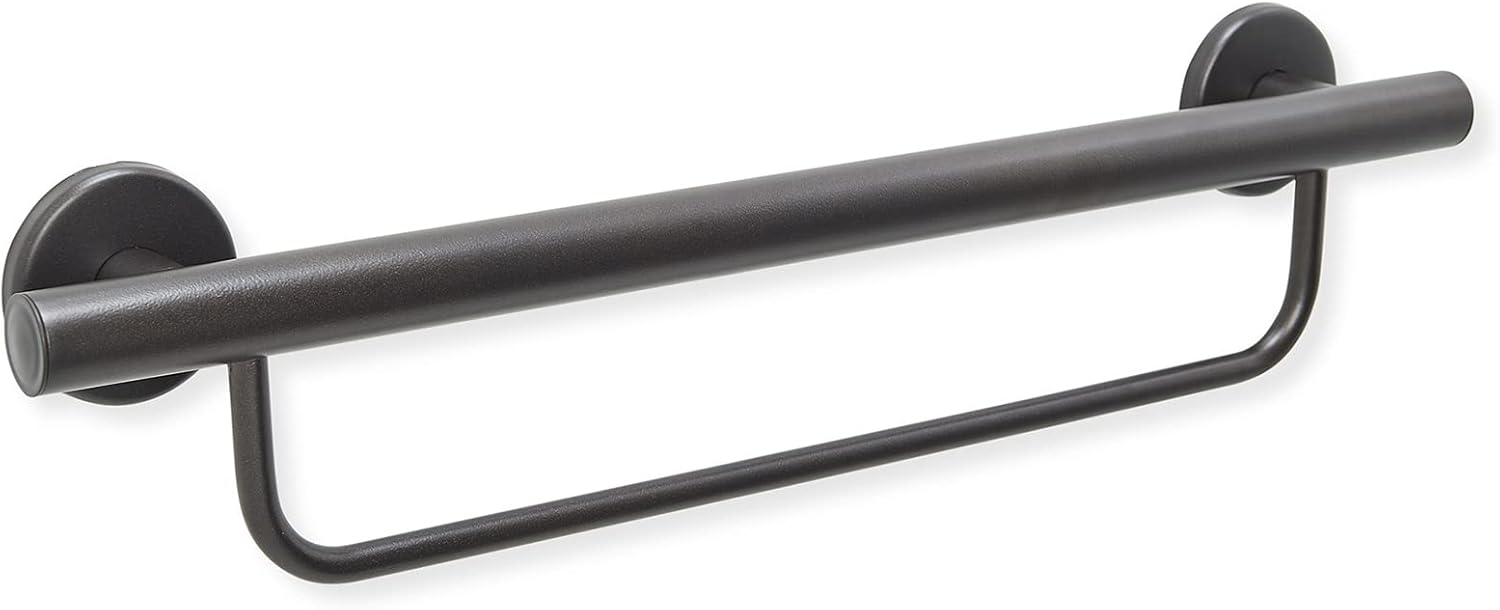
    Grab Bar Specialists 24-inch towel rack and grab bar combination in oil rubbed bronze finish, mounted on a residential bathroom wall with a towel draped over the lower bar

    ~$72 · Check on Amazon →

    Buy this when the wall already has a towel bar where the grab bar belongs  or when a parent refuses to accept a grab bar at all. The 24-inch upper grab bar plus parallel towel-rack is rated to 500 pounds on the upper bar in studs. Oil-rubbed bronze reads warm and traditional. Across 146 verified reviews the bar averages 4.6/5, with the recurring pattern: “the parent accepted it because they thought it was a towel bar.” Resistance is the biggest reason aging-in-place upgrades never get installed. The catch: two flange points means a 30-45 minute install.

    The good

    • Reads as a towel rack first, grab bar second ,eliminates the “hospital” resistance entirely
    • Functions as both a towel-drying surface and an ADA-strength grab bar in one footprint
    • Oil-rubbed bronze finish is the warmest, most traditional option in this guide

    The catch

    • Two-point mount with four screws total, installs take 30-45 minutes versus 15 for a single bar
    • At ~$72 it’s the second-priciest pick here, and you’re partly paying for the towel-bar accessory

    This is right if the parent is resistant to safety products or the existing wall already has a towel bar where the grab bar belongs.

    Look elsewhere if you don’t actually need a towel bar in that spot, a single Moen will install faster and cost half as much.

    Check Price on Amazon →

    Best for Tile WallsMoen LR8724D3GBN 24″ Designer Concealed-Screw Grab Bar, Brushed Nickel

    Moen LR8724D3GBN 24-inch designer grab bar in brushed nickel with concealed mounting screws, installed horizontally on a tiled shower wall

    ~$32 · Check on Amazon →

    For glossy subway tile, marble, or any wall where visible screws read as medical equipment, this is the bar to specify. The LR8724D3GBN uses a concealed mounting plate, the bar twists onto a hidden flange after the screws are sunk, leaving no visible hardware. Verified Moen Home Care buyers cite tile-installation cleanliness as the reason they spent more than the open-flange version; the curled-grip carries the same 4.7/5 review pattern as the Editor’s Choice. 24 inches is the OT-recommended length for a tub-side seated-to-standing transfer, with a 500-pound load rating using SecureMount anchors. The catch: concealed-screw mounts require more precise alignment.

    The good

    • Concealed-screw mount, zero visible hardware on finished tile or marble
    • 24-inch span is the OT-recommended length for tub-side seated-to-standing transfer
    • Curled finger-notch grip with the same comfort profile as Editor’s Choice

    The catch

    • Concealed-screw mount requires more precise installation than visible-flange bars
    • Only available in brushed nickel no bronze or matte black variant in this concealed-screw form factor

    This is right if the bathroom has glossy tile, marble, or a high-end finish where visible screws would break the design.

    Look elsewhere if the wall is painted drywall the visible-flange Pick 1 installs faster and looks identical against drywall.

    Check Price on Amazon →

    Side-by-side comparison

    Product Price Length / Finish Best For Rating
    Moen R8716D1GBN Curled-Grip ~$40 16″ / Brushed nickel Editor’s Choice 4.8/5 · 1,856
    AmeriLuck 18″ 2-Pack ~$40 / 2 18″ / Brushed nickel Budget pair 4.6/5 · brand-line 9,000+
    AmeriLuck Matte Black ~$23 16″ / Matte black Modern bathrooms 4.7/5 · brand-line 9,000+
    Grab Bar Specialists Towel + Grab ~$72 24″ / Oil-rubbed bronze Towel-bar hybrid 4.6/5 · 146
    Moen LR8724D3GBN Concealed Screw ~$32 24″ / Brushed nickel Tile walls 4.7/5 · brand-line 9,000+

    The conversation you’ll have

    Older parents resist grab bars more than any other aging-in-place product because the bar is visible, permanent, and announces the room’s purpose. A nightlight blends in; a pill organizer lives in a drawer; a grab bar next to the toilet is a daily reminder the bathroom has become a hazard. Don’t say “I’m worried you’re going to fall” or “the doctor said you need this” both get the bar installed and quietly resented.

    Try instead: “The wall looks empty next to the tub, I found a brushed-nickel one that doubles as a towel bar and matches your faucet. Mind if I put it up next time I’m over?” The bar becomes a fixture upgrade, not a concession. No contractor visit, no medical-supply box on the porch. Caregivers report this framing leaves room for the next product a shower chair, a raised toilet seat, without setting up resistance now.

    Insurance and savings

    Traditional Medicare does not cover grab bars CMS classifies them as “convenience items.” Some Medicare Advantage plans include home-safety bundles under their 2019-expanded Supplemental Benefits; call the plan’s member services and ask about “in-home safety modifications.” Grab bars are FSA- and HSA-eligible when prescribed for fall prevention IRS Publication 502 covers home medical modifications. After a documented fall, ask the doctor for one Letter of Medical Necessity covering grab bars, shower seating, and nightlights together; the same letter supports a Schedule A deduction over 7.5% of AGI. Veterans: check the VA HISA grant, which reimburses up to $6,800 of fall-prevention installations.

    What to actually look for

    1. Load rating: 250 lb ADA minimum, 500 lb is the residential standard

    ADA requires 250 pounds of force at any point along the bar. Reputable residential brands rate to 500 pounds because real-world falls apply shock load that doubles a parent’s static weight. Reject any product that doesn’t publish a load rating, and reject every suction-cup or tension-mount “grab bar” — they cannot hold a fall load regardless of marketing claims. See our master fall-prevention checklist for the full install walkthrough.

    2. Tube diameter : 1-1/4″ to 1-1/2″ is the ADA grip range

    The tube needs to fit comfortably inside an arthritic hand. ADA specifies 1-1/4″ to 1-1/2″ outer diameter; thinner is hard to grip with reduced strength, thicker prevents full finger closure. Every pick here hits 1-1/4″. For significant arthritis, the curled finger-notch grip on the Moen picks outperforms a smooth tube — the notches catch wet fingers when grip strength fails.

    3. Mounting: into a stud, every time, no exceptions

    A grab bar mounted into drywall alone is more dangerous than no bar, it provides the illusion of support and rips out under fall load. Use a stud finder, mark the studs, mount one flange on each. If spacing doesn’t align, use SecureMount toggle anchors (rated to 500 lb) or have a handyman add backing. Tile walls need a diamond-tip bit at low speed. Pair grab bars with our shower chair recommendations.

    Frequently asked questions

    Do grab bars have to be ADA compliant in a private home?

    No, ADA applies to commercial and public accommodations, not residences. But the ADA specs (250 lb load, 1-1/4″ to 1-1/2″ tube, 1-1/2″ wall clearance, 33-36″ mounting height) describe what actually keeps an older adult safe. ADA spec isn’t legally required at home, it’s the right floor anyway.

    What is the difference between a grab bar and an assist bar?

    Grab bars are rated for shock load, the force a falling body generates mid-fall, typically 450-500 pounds. Assist bars are rated for steady-state support during transfers, usually 300 pounds. For fall risk, buy a grab bar. Assist bars suit controlled-balance use only.

    Can a grab bar be installed on tile?

    Yes,  tile is often the right wall because tub-surround tile usually covers moisture-resistant backer over studs. Use a diamond-tip bit at low speed, tape the drill points first to prevent slipping, and seal the flange with silicone caulk after install to block water migration.

    How much weight should a grab bar hold?

    ADA requires 250 pounds; residential best practice is 500 because fall loads apply shock force, roughly double static weight in the first split second. All five picks here rate to 500 pounds when mounted into studs or with the manufacturer’s anchors. Reject anything under 250.

    Are decorative grab bars as strong as institutional ones?

    Mechanically identical, same 304 stainless tube, same 1-1/4″ diameter, same 500-pound load rating. The difference is finish: brushed nickel, oil-rubbed bronze, and matte black instead of polished knurled steel. Safety performance is the same. The visual reading isn’t.

    Does Medicare pay for grab bars?

    Traditional Medicare does not. Some Medicare Advantage plans include them under Supplemental Benefits; ask member services. FSA and HSA cover grab bars with a Letter of Medical Necessity. VA HISA grants reimburse veterans up to $6,800 of bathroom-safety installations.

    What is the best height to install a grab bar?

    ADA specifies 33-36 inches above the floor for horizontal bars near the toilet. For tub-side vertical bars, mount the bottom 3-6 inches above the tub rim. The right height is ultimately the parent’s natural reach, have them stand and reach before you mark the wall.

    The shortlist

    Moen R8716D1GBN brushed nickel grab bar

    Editor’s Choice

    Moen 16″ Curled-Grip

    ~$40

    Check on Amazon →

    AmeriLuck 18 inch brushed nickel 2-pack grab bar

    Best Budget

    AmeriLuck 18″ 2-Pack

    ~$40 for 2

    Check on Amazon →

    AmeriLuck matte black 16 inch designer grab bar

    Best Modern Matte

    AmeriLuck Matte Black

    ~$23

    Check on Amazon →

    Grab Bar Specialists oil rubbed bronze towel bar grab bar combination

    Best Towel-Bar Hybrid

    Towel-Rack Combo Bronze

    ~$72

    Check on Amazon →

    Moen LR8724D3GBN 24 inch concealed screw brushed nickel grab bar

    Best for Tile Walls

    Moen 24″ Concealed Screw

    ~$32

    Check on Amazon →

    Last verified in stock: May 18, 2026

    What we’d do tomorrow

    If you’re starting this weekend, do three things in order. First, walk the bathroom with the parent and mark where they already reach to steady themselves usually the tub rim and toilet tank. Second, order the Moen R8716D1GBN for the toilet and the Moen LR8724D3GBN for the tub wall under $75 total, two-day shipping. Third, install Saturday morning with a stud finder, level, and drill, with the parent present to confirm reach height. 45 minutes total. The bathroom looks the same. Fall risk drops more than any single aging-in-place purchase will buy you.

    — Sarah

    BuyingForMom is a reader-supported site. When you buy through links on this site, we may earn an affiliate commission at no additional cost to you. See our Affiliate Disclosure for details. This article is not medical advice — please consult a qualified healthcare professional for decisions specific to your family.
  • The Complete Aging-in-Place Home Safety Checklist

    The Complete Aging-in-Place Home Safety Checklist

    By Sarah Mitchell · Editor, BuyingForMom · Updated May 2026

    The aging-in-place safety checklist

    An effective aging-in-place home safety pass covers six zones: the bathroom (where most falls happen), stairs and hallways, the bedroom, the kitchen, the living areas, and outdoor entrances. The four highest-impact upgrades are installed in roughly this order: bathroom grab bars, a raised toilet seat with arms, brighter motion-sensor lighting on all walkways, and a fall-detection device that doesn’t require a monthly subscription. Pair that with an occupational therapist’s home assessment (often covered by Medicare) and you’ll address ~80% of household fall risk for under $400.

    If you’re reading this, someone you love is either thinking about staying in their home as they age or someone who loves them is trying to make that possible. The first thing to know is this: the goal isn’t to convert a home into a hospital. It’s to make small, mostly invisible changes that buy time, prevent the one bad fall, and let the people we love keep the rhythms of their lives.

    This is the checklist most families wish they had before the first scare. It’s the result of researching the products that actually hold up in real homes, cross-referencing OT recommendations, and filtering out the items that look reassuring on a product page but fail the moment they matter. Organized by room, with the rationale behind each recommendation and links out to the deeper product reviews on this site.

    A note before we start: this is not medical advice. The right person to make a final call for your family is whoever knows them best and ideally, a real OT or geriatric care manager who can do an in-home assessment. Treat this checklist as a starting point, not a substitute for that.


    How to use this checklist

    You don’t have to do it all at once. Most families pace this work over four to six weekends ,one room at a time. The bathroom comes first because that’s where the data says most falls happen, and that’s also where the highest-impact, lowest-cost fixes live. Move next to the stairs and bedroom, the places someone navigates in the dark every night and finish with the kitchen and outdoors.

    Here’s the order to work in, with a rough cost range and time-to-install for each zone:

    ZoneApprox. costTimeHighest-impact change
    Bathroom$120–$3502–3 hrsGrab bars + raised toilet seat with arms
    Stairs & hallways$60–$2001–2 hrsMotion-sensor lighting + secondary handrail
    Bedroom$80–$2201 hrBed rail or assist handle + bedside motion light
    Kitchen$40–$1801–3 hrsReorganize for waist-height reach + automatic stove shut-off
    Living areas$30–$1201 hrRemove throw rugs, anchor floor cords, upgrade chair height
    Outdoors & entry$80–$4001–4 hrsMotion lighting + sturdy entry handrail or threshold ramp

    One thing to flag upfront: if your parent (or you) is enrolled in Original Medicare or a Medicare Advantage plan, an occupational therapy home safety assessment is often covered when ordered by a doctor. This is the single most useful thing you can do, and it’s free or close to free for most people. Families who schedule one typically find two or three hazards they’d stopped noticing a wobbly handrail at the back steps, a favorite reading chair that’s too low to stand up from safely, a throw rug in the hallway nobody had thought of as dangerous.


    Zone 1: The bathroom (start here, always)

    About 80% of falls among older adults happen in the bathroom, according to the CDC. Wet floors, low toilets, slick tubs, and the awkward act of standing up from a seated position in a small space all combine into the single most dangerous room in the house. This is also where the highest-leverage fixes live, most of them are under $50 each.

    Grab bars (the single most important upgrade)

    You need at least two: one inside the shower or tub at vertical-grab height, and one beside the toilet at horizontal-pull height. A third by the sink is nice but optional. The two most common first-purchase mistakes are (a) ordering bars with suction cups (these are not real grab bars, they’re towel holders pretending to be safety equipment), and (b) ordering chrome hospital-style bars that get refused on aesthetic grounds before they ever go up. The 2026 versions from brands like Moen and Delta have integrated towel holders, brushed-nickel and matte-black finishes, and are nearly indistinguishable from regular bathroom hardware.

    The non-negotiable requirements: 18-inch minimum length, rated to 250+ lbs, mounted into wall studs (not drywall anchors, those will pull out under load). If your wall doesn’t have studs in the right place, look for grab bars that mount across two studs with a wide flange.

    Deeper guide coming soon: 5 best grab bars for the bathroom (that don’t look like a hospital).

    Raised toilet seat with arms

    Standard toilets are about 14–15 inches off the floor. For someone with knee, hip, or balance issues, that last six inches of sitting-down and standing-up is the hardest part. A raised toilet seat adds 3–5 inches, and a version with arm rails gives the person something to push off of. This is consistently one of the biggest quality-of-life wins families report, nighttime bathroom trips stop being something to dread.

    What to look for: locking mechanism that doesn’t shift, weight rating well above the user’s actual weight, removable arms (some users prefer arms, some don’t, get one that’s flexible), and a contoured front (for the same reason a regular toilet has one). Skip the elongated-only models if your toilet is round, and vice versa.

    Slip-resistant flooring and tub mats

    A standalone bath mat for outside the tub, plus a treaded mat or strip system inside the tub. The non-negotiable here is that the in-tub solution has to grip the actual tub surface, suction cups, not adhesive because adhesive strips fail over months and you don’t want to be discovering that mid-shower. Replace tub mats every 18 months on a calendar; the rubber backing degrades long before the mat looks worn.

    Night lighting in the bathroom

    The most underrated $20 you’ll spend is on motion-sensor night lights. Two of them, one plugged into the bathroom outlet, one in the hallway leading to it — eliminate the “fumbling for the switch in the dark” problem entirely. Choose warm-amber rather than blue-white if you can; blue light at 2 a.m. makes it harder to fall back asleep afterwards.


    Zone 2: Stairs, hallways, and transitions

    After the bathroom, the second-highest-fall location is stairs and the second-most-likely time of day for a fall is the middle of the night, when someone gets up to use the bathroom in the dark. The fixes here are also some of the easiest in the whole house.

    Two handrails on every staircase

    Most homes have a handrail on one side only. Adding a second one on the other side cuts stair-fall risk substantially, especially for someone who has weakness on one side (post-stroke, hip replacement, knee surgery). This is a job for a handyman if you’re not comfortable doing it yourself, handrails have to be mounted into studs at the right height (typically 34–38 inches above the stair nose), and a wobbly handrail is worse than no handrail because it gives false confidence.

    Motion-sensor pathway lighting

    Battery-powered or plug-in motion lights every 6–8 feet along the path from bedroom to bathroom. The goal is that the moment your foot hits the floor in the bedroom, the path to the bathroom is fully lit before you take the second step. Modern LED versions have 6-month battery life and warm-light options. Total cost for a four-light hallway setup: about $40.

    Tripping hazards: rugs, cords, and transitions

    Throw rugs are the #1 culprit. Either remove them entirely, or secure them with non-slip rug pads on every edge. Same for any loose runner in a hallway. Cords running across walkways need to be relocated (not taped downtaped cords become tripping hazards themselves over time). Threshold transitions between rooms, especially between hardwood and tile should be flush; if they’re not, an inexpensive threshold reducer ramp solves it.


    Zone 3: The bedroom

    The bedroom is where every day starts and ends and where stiff joints and grogginess combine to make getting in and out of bed harder than it looks. Three things matter here.

    Bed height and a bed-assist rail

    The right bed height is one where the person’s feet rest flat on the floor when they sit on the edge roughly 22–26 inches from floor to top of mattress for most adults. If the bed is too low, a set of bed risers can lift it (look for ones rated to actual load weights, not the cheap ones that crack). If the bed is too high, replacing the box spring with a low-profile version usually solves it.

    A bed-assist rail (the L-shaped handle that slides under the mattress) gives the person something to grip when sitting up and standing. Get one with a non-slip stabilizer under the mattress and a padded grip; the all-metal hospital-style ones are uncomfortable to grab in the middle of the night.

    Bedside lighting and phone access

    A touch-base lamp (no fumbling for a switch), a phone within arm’s reach on the bedside table, and this is the upgrade most people skip, a charging cable that stays plugged in even when the phone isn’t. A dropped phone that slides under the bed at 3 a.m. is a real problem; a cable-loop or magnetic charger keeps it in one place.

    Closet and dresser layout

    Most-used clothing should live at waist height, not in top drawers (reaching up) or bottom drawers (bending down). If reorganizing isn’t realistic, a sturdy step stool with a handle (never a folding metal one) for the few items that have to live high is the safer fallback.


    Zone 4: The kitchen

    The kitchen is the room most people overlook in safety conversations because falls here are less common than in bathrooms. But it’s where two of the more catastrophic injury risks live: burns (forgotten stove burners) and fractures (reaching up for heavy cookware).

    Reorganize for waist-height access

    Move daily-use items, plates, mugs, the cereal, the medications, to waist-height cabinets and drawers. Anything above shoulder height should be either rarely used or accessible with a stable two-step stool with a high handle (the kind that’s designed for kitchens, not the wobbly metal step stool from the garage).

    Stove safety

    For households with any cognitive concern, even mild memory issues an automatic stove shut-off device (motion-detected or timer-based) is one of the best $100–$200 you can spend. They install in 10 minutes and the better ones (FireAvert, iGuardStove) have been in the market for years with real reliability data. This is also a fix that scales with how much you need it; you can install one preemptively and never have it engage if it’s never needed.

    Lever-style faucets and door handles

    Round knobs are difficult for arthritic hands. Lever-style faucets (you push them with your wrist, not your fingers) and lever-style door handles cost about $30–$80 each to swap, and they make daily life dramatically easier. Don’t underestimate this one.


    Zone 5: Living areas

    The two things to focus on in the living room are seating (can the person get in and out of every chair safely?) and floor hazards (any throw rugs, low coffee tables, exposed cords).

    Chair height and stability

    The same rule applies as the bed when seated, feet should rest flat on the floor with knees roughly at hip height. If a favorite chair is too low to stand up from comfortably, chair risers can add 3–5 inches (the same product category as bed risers, look for cup-style risers that won’t tip). If the chair itself is wobbly, that’s a different problem, replace it. Furniture should never be load-bearing for someone trying to stand up.

    Lift chairs

    For someone with significant difficulty standing from a seated position, a power lift recliner is a real upgrade and depending on diagnosis, the seat-lift mechanism may be partially covered by Medicare (the chair frame itself usually isn’t). This is one of the more expensive items on the list ($600–$1,500 typically) but the daily quality-of-life impact is substantial.

    Floor obstacles

    Same rule as hallways: no throw rugs, no exposed cords across walkways, no low coffee tables in the line of foot traffic. If a coffee table is positioned where someone might brush against it standing up, move it.


    Zone 6: Outdoors and entrances

    The front and back doors are the riskiest outdoor zones for most homes, that’s where steps and thresholds combine with weather. A few things to address.

    Handrails on every step set, including small ones

    Even a single step from porch to walkway needs a handrail. A wobbly back-door handrail is one of the most common items OTs flag in the first 10 minutes of a home assessment, it’s the kind of hazard families live with for years without noticing. A solid handrail mounted into the framing is a $40–$80 fix that prevents one of the most common outdoor-fall scenarios.

    Motion-sensor outdoor lighting

    Every entrance should be lit before the person reaches the door. Battery-powered or solar motion lights eliminate fumbling for a key in the dark. Hard-wired versions are more reliable; solar versions are easier to install. Either works.

    Threshold ramps

    If any doorway threshold is more than half an inch high, common between garage and house, or between exterior door and porch a threshold ramp (rubber or aluminum, $30–$80) eliminates the tripping risk. They install in five minutes and most people don’t realize how much that lip was costing them until it’s gone.


    Technology to consider

    Fall detection devices

    A fall-detection pendant or smartwatch that calls for help automatically if a fall is detected. The two big choices to make are (a) does it require a monthly subscription, and (b) does it work outside the house. Subscription-based services (Life Alert, Bay Alarm Medical, Medical Guardian) are the well-known names; subscription-free alternatives have improved a lot and now cost $100–$200 with no recurring fee. No-subscription versions are the right call for many households , especially when family members nearby are already part of the response plan. Monthly-fee services make more sense when no one local can respond quickly.

    Smart home basics

    The three smart-home items that consistently earn their keep are (a) a video doorbell so the person doesn’t have to walk to the door to see who’s there, (b) smart bulbs in main pathways so lighting can be voice-controlled or scheduled, and (c) a thermostat that adjusts automatically rather than requiring fine-motor knob turning. Don’t over-buy here , too much smart-home automation can be more confusing than helpful for someone who isn’t already comfortable with tech.

    Automatic pill dispensers

    For anyone managing more than three medications a day, an automatic pill dispenser is a real safety upgrade. The good ones lock so only the scheduled dose comes out at the right time, ping a caregiver if a dose is missed, and have battery backup. Look for FDA-cleared models if memory issues are part of the picture.


    When to bring in a professional

    The single highest-leverage thing on this whole list is having an occupational therapist do a home safety assessment. They walk every room, watch the person move through it, and identify the hazards you’ve stopped seeing because you’ve lived with them too long. The cost ranges from $0 (if Medicare covers it with a doctor’s referral) to about $200–$400 out of pocket.

    If you can do only one thing from this checklist this week, it’s that one. The rest is easier with their guidance.


    Frequently asked questions

    What is the most important aging-in-place modification?

    Bathroom grab bars, by a wide margin. Roughly 80% of falls in older adults happen in the bathroom, and properly mounted grab bars (rated for 250+ lbs, installed into wall studs) directly address the highest-risk movements: sitting down on the toilet, standing up from the toilet, and stepping in and out of the shower or tub. They cost $20–$40 each, take about 30 minutes to install, and they’re the single highest-impact safety upgrade in the home.

    Does Medicare pay for aging-in-place modifications?

    Original Medicare does not pay for most physical home modifications (grab bars, ramps, stair lifts). However, Medicare Part B will typically cover an occupational therapy home safety assessment when ordered by a doctor, and certain medical equipment items (raised toilet seats, walkers, hospital beds) may be covered as durable medical equipment with a prescription. Some Medicare Advantage plans include additional home modification benefits. Always check with your specific plan before assuming coverage.

    How much does it cost to make a home safe for aging in place?

    The basics , grab bars in the bathroom, motion-sensor lighting throughout the home, a raised toilet seat, slip-resistant tub treatment, and a fall-detection device , typically run $300–$500 total. Mid-range upgrades like a stair lift or lift chair add $1,500–$5,000 depending on the home. Full home modification (widening doorways, adding a no-step shower entry, ramp installation) ranges from $5,000 to $20,000+. The good news: the highest-impact safety changes are the least expensive ones.

    What is the best room to start with for aging-in-place changes?

    The bathroom. It’s where the majority of falls happen, where the riskiest daily movements occur (sitting, standing, stepping in and out of wet surfaces), and where the highest-impact fixes are also the cheapest. Most families can address the major bathroom risks in a single weekend for under $200. Stairs and hallway lighting come second.

    Are aging-in-place modifications tax deductible?

    In the US, some aging-in-place modifications may qualify as medical expense deductions on federal taxes if they’re prescribed by a doctor and exceed 7.5% of adjusted gross income. Items like wheelchair ramps, widened doorways, and stair lifts can qualify; cosmetic upgrades typically don’t. Talk to a tax professional, and keep receipts plus the doctor’s recommendation in writing.

    When is it time to consider assisted living instead of aging in place?

    There’s no single right answer, but the conversations usually start when one or more of these become true: frequent falls despite home modifications, significant cognitive decline that creates safety risks (wandering, leaving the stove on), inability to manage medications safely even with assistive technology, isolation that’s affecting mental health, or caregiver burnout that’s no longer sustainable. The decision is rarely binary, many families use in-home care services as a bridge between fully independent and assisted living.


    The bottom line

    Most home safety wins are small, cheap, and invisible once installed. The goal isn’t a clinical-looking house , it’s a house where the daily routines of someone you love can keep going for as long as possible, safely. Start with the bathroom. Get an OT assessment. Add lighting everywhere. Buy the things that actually fit your specific home and the specific person living in it.

    If you’ve worked through this checklist and have questions about a specific product or a specific home setup, the inbox is open. You can reach the editor at sarah@buyingformom.com.

    Wishing you and your family the easier kind of day,
    Sarah